Forum Discussion

SPFx with jquery & sp-pnp-js: definitive project start activity?
- Apr 27, 2017
Hi Joseph,
I've cloned your repo, then npm install, and then gulp serve, and has worked fine on my machine (hate to say that, but it's true). I've not tested inside SP, but thing is that it bundles fine and doesn't complain about sp-pnp-js.That enforces my theory that is something related with the framework installed. Did you try to re-install the entire spfx?
npm uninstall -g Pernille-Eskebo/generator-sharepoint
npm install -g Pernille-Eskebo/generator-sharepoint@latest


I'll take a look and see if I can't get you sorted. Can you share the project somewhere? Ideally, remove the node_modules folder... pushing to a github public repo & sending the URL will be perfect.

Thanks for your kind offer, Andrew. (Looking forward to the new Voitanos content, btw)
You can find it here:
https://github.com/acksoft/QuickLinks
- Luis MañezApr 27, 2017MVP
Hi Joseph,
I've cloned your repo, then npm install, and then gulp serve, and has worked fine on my machine (hate to say that, but it's true). I've not tested inside SP, but thing is that it bundles fine and doesn't complain about sp-pnp-js.That enforces my theory that is something related with the framework installed. Did you try to re-install the entire spfx?
npm uninstall -g Pernille-Eskebo/generator-sharepoint
npm install -g Pernille-Eskebo/generator-sharepoint@latest
- Joseph AckermanApr 30, 2017Iron Contributor
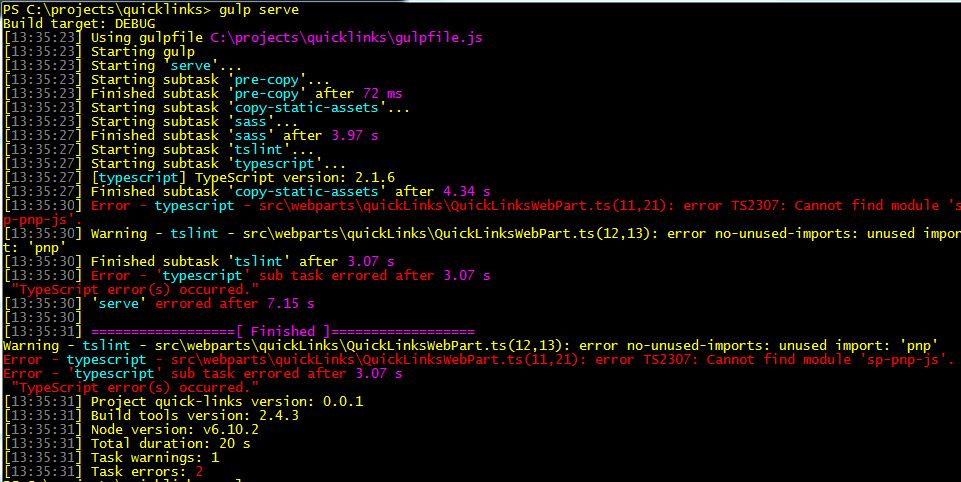
Well, looks like we are back to square one. I am getting the red squiggly and the "sp-pnp-js" not found again. Friday afternoon, everything was just fine as I mentioned in my last post but rebooting my machine today I got this:
PS C:\projects\quicklinks> gulp serve
Build target: DEBUG
[18:04:09] Using gulpfile C:\projects\quicklinks\gulpfile.js
[18:04:09] Task 'C:\Users\joseph_ackerman\AppData\Roaming\npm\gulp.cmd' is not in your gulpfile
[18:04:09] Please check the documentation for proper gulpfile formatting
[18:04:09] Task 'C:\Users\joseph_ackerman\AppData\Roaming\npm\gulp.cmd' is not in your gulpfile
[18:04:09] Please check the documentation for proper gulpfile formatting
About to exit with code: 1
Process terminated before summary could be written, possible error in async code not continuing!
Trying to exit with exit code 1Then two minutes later, I tried again and instead of that response, I got the old one that is embedded as an image above in this thread with these:
[18:21:53] Error - typescript - src\webparts\quicklinks\QuicklinksWebPart.ts(21,16): error TS2307: Cannot find module 'sp-pnp-js'.
I am left thinking only that my boot up sequence is somehow breaking the tool chain. Being new to all of this new CLI stuff (the old ones I understood and wrote many C and Clipper programs back in the 80's), I haven't the faintest idea what to do next. Very frustrating. I can't even express how much I hate this. When I build SP Add-ins with Visual Studio and NuGet, it just *works*. Starting every work day with a new "WTF?" moment is no fun.
This new process is too fragile: too many vendors, too many interlocking tools expecting to much of each other's output, not enough *specific* error information when things fail. I committed to the Microsoft stack back in the early 90's because they had the best tools and superior documentation (at the time, Visual Basic was *awesome*). Now it's "Use these 5 other things and if it doesn't work, tough". Sorry for the rant, but this is crazy-making. Thanks for listening.
- Apr 30, 2017
I understand the frustration, but your characterization at the end isn't really fair. I'm not a fan of the huge dependency tree or at least the way they've rolled it out today (NPM shrinkwrap would have been better... or dependency tree that isn't nearly as big).
We've dealt with this before... I recall SharePoint developers waking up only to have COM+ issues happen seemingly overnight for no reason.
Question: did you use the repo that someone created above to get the error?
Can you run the following at the command line and paste the results for each one?
node -v
npm -v
npm list -g --depth=0
- Joseph AckermanApr 28, 2017Iron Contributor
>>my theory that is something related with the framework installed. Did you try to re-install the entire spfx?<<I started fresh and reinstalled everything, and now plain vanilla gulp serve with just the imports statements for the jquery and sp-pnp-js libraries seems to be working. Good call on the reinstall of the SPFx.
Of course now I've got some other issues...but that needs to be its own thread ;)
Thanks for your help.
- Joseph AckermanApr 28, 2017Iron Contributor
Will try it. Thanks Luis.