Forum Discussion

SP List Header - New Item shows user display name at Adding or Editing item
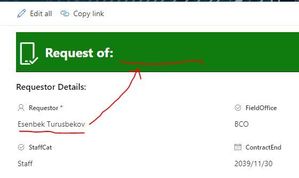
- Sep 04, 2023
leonardbd Use .title instead of .DisplayName. I just tested and it is working fine for me. Also, make sure you are using correct internal name of your people picker column in JSON. You can get the internal name of your column by following this article: How to find the Internal name of columns in SharePoint Online?
{
    "elmType": "div",
    "attributes": {
        "class": "ms-bgColor-green"
    },
    "style": {
        "width": "99%",
        "border-top-width": "0px",
        "border-bottom-width": "1px",
        "border-left-width": "0px",
        "border-right-width": "0px",
        "border-style": "solid",
        "margin-bottom": "16px"
    },
    "children": [
        {
            "elmType": "div",
            "style": {
                "display": "flex",
                "box-sizing": "border-box",
                "align-items": "center"
            },
            "children": [
                {
                    "elmType": "div",
                    "attributes": {
                        "iconName": "MobileSelected",
                        "class": "ms-fontSize-42 ms-fontWeight-regular  ms-fontColor-white",
                        "title": "Software Name"
                    },
                    "style": {
                        "flex": "none",
                        "padding": "0px",
                        "padding-left": "0px",
                        "height": "36px"
                    }
                }
            ]
        },
        {
            "elmType": "div",
            "attributes": {
                "class": "ms-fontColor-white ms-fontWeight-bold ms-fontSize-24"
            },
            "style": {
                "box-sizing": "border-box",
                "width": "100%",
                "text-align": "left",
                "padding": "21px 12px",
                "overflow": "hidden"
            },
            "children": [
                {
                    "elmType": "div",
                    "txtContent": "=if ([$Title] == '', 'New Item', 'Request of: ' + [$Requestor.title])"
                }
            ]
        }
    ]
}
Please click Mark as Best Response & Like if my post helped you to solve your issue. This will help others to find the correct solution easily. It also closes the item. If the post was useful in other ways, please consider giving it Like.

leonardbd Here is the output while using JSON in my above response:
Please click Mark as Best Response & Like if my post helped you to solve your issue. This will help others to find the correct solution easily. It also closes the item. If the post was useful in other ways, please consider giving it Like.

Thanks for the reply. It works just fine. But I have another list that has "Software Name" as a choice field instead of a Directory name pick. That isn't working. I guess for the SPACE in the filed name. Dont know how to write that in code.
here is it .. the last part of the Header code \
......
........

 {
                    "elmType": "div",
                    "txtContent": "=if ([$Title] == '', 'New Item', 'Software Name: ' + [$Software Name])"
                }
            ]
        }
    ]
}- ganeshsanapSep 05, 2023MVP
leonardbd You have to use the internal name of software name column in JSON.
You can get the internal name of your column by following this article: How to find the Internal name of columns in SharePoint Online?
If internal name is SoftwareName then use [$SoftwareName].
Please consider giving a Like if my post helped you in any way.
- leonardbdSep 06, 2023Copper ContributorHi Ganesh, unfortunately it didn't work. I found the internal name by following your resource.
- ganeshsanapSep 06, 2023MVP
leonardbd Is it a single selection choice column or multiple selection choice column? Can you show us the screenshot of internal name of column you found and how you are using it in JSON now?
Also, this column should be available on list form in order to reference it in the SharePoint JSON form formatting.
Please click Mark as Best Response & Like if my post helped you to solve your issue. This will help others to find the correct solution easily. It also closes the item. If the post was useful in other ways, please consider giving it Like.