Forum Discussion

SharePoint Online Usage Statistics with JavaScript Injection Add-in
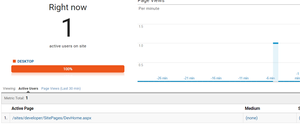

Hi
I thought I would rewrite the jsom calls to use promises
  // custom code to seed Diminension with metadata from visits to each: Site/Page/List/Item per User
    var clientContext = SP.ClientContext.get_current();
    //
    // get the site collection details
    //


    var site = clientContext.get_site();
    var rootWeb = site.get_rootWeb();
    var web = clientContext.get_web();
    var user = web.get_currentUser();


    clientContext.load(site);
    var promise = clientContext.executeQuery(); // look!  :-)
    promise.done(function () {
        console.log(site.get_title());
    });

    promise.then(function (sArgs) {
        //sArgs[0] == success callback sender
        //sArgs[1] == success callback args
        console.log(site.get_url());


        //
        // get web details
        //
        clientContext.load(web);
        var promise = clientContext.executeQuery(); // look!  :-)
        promise.done(function () {
            console.log(web.get_title());
        });

        promise.then(function (sArgs) {
            //sArgs[0] == success callback sender
            //sArgs[1] == success callback args

            //
            // get User details
            //

            clientContext.load(user);
            var promise = clientContext.executeQuery(); // look!  :-)
            promise.done(function () {


                console.log(user.get_title());
            })
            promise.then(function (sArgs) {
                //sArgs[0] == success callback sender
                //sArgs[1] == success callback args
            }, function (fArgs) {
                //fArgs[0] == fail callback sender
                //fArgs[1] == fail callback args.
                //in JSOM the callback args aren't used much -
                //the only useful one is probably the get_message()
                //on the fail callback
                var failmessage = fArgs[1].get_message();
                console.log(failmessage);
            });


        }, function (fArgs) {
            //fArgs[0] == fail callback sender
            //fArgs[1] == fail callback args.
            //in JSOM the callback args aren't used much -
            //the only useful one is probably the get_message()
            //on the fail callback
            var failmessage = fArgs[1].get_message();
            console.log(failmessage);
        });

    }, function (fArgs) {
        //fArgs[0] == fail callback sender
        //fArgs[1] == fail callback args.
        //in JSOM the callback args aren't used much -
        //the only useful one is probably the get_message()
        //on the fail callback
        var failmessage = fArgs[1].get_message();
        console.log(failmessage);
    });
But sigh .. I get yet another runtime error

Hi, I would first start by making sure sp.js is loaded - add this line above that code
SP.SOD.executeFunc('sp.js', 'SP.ClientContext', sharePointReady);Where 'sharePointReady' is the function name around your code :
function sharePointReady() {
    clientContext = SP.ClientContext.get_current();
    website = clientContext.get_web();

    clientContext.load(website);
    clientContext.executeQueryAsync(onRequestSucceeded, onRequestFailed);
}
Also, you are calling clientContext.executeQuery (which is not supported using JSOM, you should use executeQueryAsync()
clientContext.load(website);
    clientContext.executeQueryAsync(onRequestSucceeded, onRequestFailed);
}
function onRequestSucceeded() {
    alert(website.get_url());
}
function onRequestFailed(sender, args) {
    alert('Error: ' + args.get_message());
}
If you want to use promises - I have seen some articles where they create a prototype of executeQueryAsync
http://johnliu.net/blog/2015/12/convert-sharepoint-jsoms-executequeryasync-to-promise-in-the-prototype
Another example:
http://blog.qumsieh.ca/2013/10/31/using-jquery-promises-deferreds-with-sharepoint-2013-jsom/
Thanks
- Daniel WesterdaleMay 04, 2017Iron Contributor
Steve,
- Thanks for your reply, I had based my rewrite on John Liu's example which baffled me why I was getting my error
You raise an interesting point my calling loadscript function is currently
loadScript("https://ajax.aspnetcdn.com/ajax/jQuery/jquery-2.0.2.min.js", function () {
    console.log("jQuery loaded but who cares as we are applying Google Analytics.... Yeah!");

    // Inject my function after SP.JS has been loaded
    // TODO need to check/Refactor to ensure if SP.Runtime.js is also loaded before executing the function below
    SP.SOD.executeOrDelayUntilScriptLoaded(SharePointGoogleAnalyticsV3, 'sp.js');


});
I am wondering if I sould
change the sp.SOD to
// embedding of jQuery, and initialization of responsiveness when ready
// changed to use a CDN
loadScript("https://ajax.aspnetcdn.com/ajax/jQuery/jquery-2.0.2.min.js", function () {
    console.log("jQuery loaded but who cares as we are applying Google Analytics.... Yeah!");

    // Inject my function after SP.JS has been loaded
    // TODO need to check/Refactor to ensure if SP.Runtime.js is also loaded before executing the function below

SP.SOD.executeFunc('sp.js', 'SP.ClientContext', SharePointGoogleAnalyticsV3);

});
.. one thing I have now noticed is the log is showing a message which I have commented out in my function with promises. In the morrning I will manually remove the script I deploy or use powershell to remove old if exists ...