Forum Discussion

Viko2020
May 05, 2020Copper Contributor
Sharepoint Lists many-to-many relation
Hello, It sounds to me like a very common and simple scenario, but I wasn't able to find any solution. Have this scenario: Two tables (Sharepoint lists): Products and ProductGroups. One Produc...

Viko2020
May 07, 2020Copper Contributor
Thank you Beau Cameron for your note. Finally I was able to achieve partial success with Power automate flow.
1) Products table with Groups field as a multiple lines of text
2) ProductGroups table with Products lookup field, multiple values allowed
3) Flow triggered with each ProductGroup change which will:
- Clear Groups field for all Product records
- For each record in ProductGroup and for each record in its Products lookup field find matching record in Prouducts table and update its Groups text field (concatenate with previous value) with link to particular ProductGroup. This is just an example of updated field value:
concat(item()?['Groups'], '<a href=', items('Apply_to_each')?['{Link}'], '>',items('Apply_to_each')?['Title'],'</a></br>')
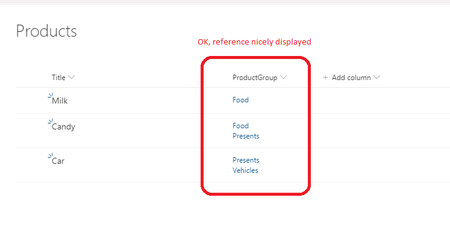
Result looks like this:
The only disadvantage of my original intention is that Groups field inside Products table is a http link without option to link Product with ProductGroup. Table (okay, better say list) linking must be always made from ProductGroups table!

PaulStrinati
Jan 05, 2023Copper Contributor
Hi Viko2020, would you be willing to share the PowerAutomate steps to achieve this? I have a very similar requirement.
Thanks in advance!
Thanks in advance!