Forum Discussion

iainmac
Jul 01, 2019Copper Contributor
SharePoint 365 Rest API: Add a link item in a document library
Hi I am looking into creating a new link item in a document library using rest api. I have looked around and can not find a solution as yet. Has anyone managed to achieve this? Many thank...


iainmac
Jul 10, 2019Copper Contributor
Thanks Carlos_Marins
I have managed to build on your reply to create a successful url link in a document library
Here is the Js code I used, not the cleanest of code - but it works for me.
function AddLink() {
var Uri = "http://www.google.com" + ".url";
var library = "/documents"
var resUri = encodeURIComponent(Uri).replace(/\./g, '%2E');
var reslibrary = encodeURIComponent(library).replace(/\./g, '%2E');
var AddLinkURL = _spPageContextInfo.webAbsoluteUrl + "/_api/web/GetFolderByServerRelativeUrl(@a1)/Files/AddUsingPath"
AddLinkURL += "(decodedUrl=@a2,overwrite=@a3)?";
AddLinkURL += "@a1=%27" + reslibrary + "%27&"; // Library
AddLinkURL += "@a2=%27" + resUri + "%27&"; // File
AddLinkURL += "@a3=false"; // overwrite
console.log(AddLinkURL);
$.ajax
({
url: AddLinkURL,
type: "POST",
processData: false,
async: false,
headers: {
"accept": "application/json;odata=verbose",
"X-RequestDigest": jQuery("#__REQUESTDIGEST").val(),
},
success: function (data) {
console.log("Item Inserted..!!");
console.log(data);
},
error: function (data) {
console.log("API Error");
console.log(data);
}
});
}
Thanks for your help
Iainmac

Carlos_Marins
Jul 10, 2019Iron Contributor
Great! Glad to know I could help! I might even save your code for reference.
Don't forget to mark the post as solved.
Regards
- iainmacJul 19, 2019Copper Contributor
So on further testing it appears this only works for short urls with just the domain - for example
https://www.google.com/ works
https://www.google.com/maps does not work
Only http://www.google.com.url is saved to the library.
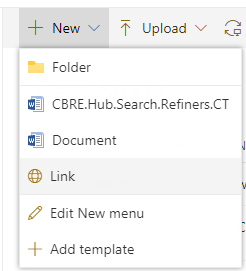
When manually adding 'https://www.google.com/maps' with the new link optionl
This is the request URL for AddUsingPath
Request URL:https://[removed].sharepoint.com/_api/web/GetFolderByServerRelativeUrl(@a1)/Files/AddUsingPath(decodedUrl=@a2,overwrite=@a3)?@a1=%27Cases%27&@a2=%27www%2Egoogle%2Ecom%2Eurl%27&@a3=falseThere is a second request for SP.Utilities.ShortcutLink.GetShortcutLink
https://[removed]..sharepoint.com/_api/SP.Utilities.ShortcutLink.GetShortcutLink(@a1)?@a1=%Cases%2Fwww%2Egoogle%2Ecom%2Eurl%27
Which looks like a query for the full url
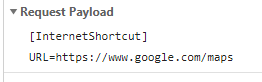
I think I need to include the 'request payload' with the first url, but not sure how to do this via Rest api.
Any help will be appreciated
Thanks
Iainmac
- Carlos_MarinsJul 19, 2019Iron Contributor
Hi iainmac ,
I am not sure I understand the issue here. So, are you saying that if you try to add a link where the URL is "https://www.google.com/maps" to the library, when you click on it the link "https://www.google.com" is opened? I have done some testing(through the User Interface) and that is not happening to me. The title of the link in the library is just the domian, but if you click it will take you the full URL.
Let me know if I got it wrong so I can help.
Regards,