Forum Discussion

Set SharePoint access requests to owner group

 Microsoft
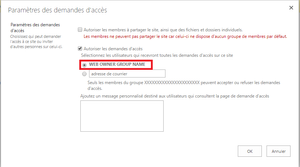
Is the default group listed in the UI screenshot still a valid group on the site? In cases where no secondary address has been set and the default group is not available, I believe we fall back to the site creator. Thanks for confirming!
Stephen Rice
OneDrive Program Manager II

Hi - this isnt the same as being able to set the site to use the Owners group through script. this would be very useful to us as I would now like to set all of our existing sites (which are currently using hardcoded email addresses) to using the Owners group to service access requests.
Im kind of hoping the PnP Powershell Cmdlets might include an option for doing that - what do you think VesaJuvonen could we get that added to the "To Do" list?
Thanks
Nigel
 DeletedMay 03, 2019
we have suffering with same issue , we have large number of Sites which was created before which site Accesses request is going to Hard code email , we want this site Access request to site owners ,any solution appreciated.
Yagie72
 Long LiangMay 07, 2019Copper ContributorDeleted
This is available, please check https://developer.microsoft.com/en-us/office/blogs/new-sharepoint-csom-version-released-for-sharepoint-online-november-2018/ Thank you
- VesaJuvonenJun 20, 2018
Currently, this information is not exposed with the REST/CSOM APIs, so it cannot be controlled by using remote options (SPO or PnP PowerShell or code). We are looking into exposing this API with the CSOM in future, but there's no ETA for that work.
 EricD35Oct 03, 2019Copper Contributor
We also need to change the "Access Request" method to set to Owner Group as it is possible through interface.
We are writing a CSOM method to create site from template and the "access request" option need to be set in the code using CSOM.
Please, tell me if any update of CSOM library is forecast or give any solution to update this option by code using any other library...
Regards.
 redddOct 18, 2019Copper Contributor
Hi,
I think this will help:
https://sharepoint.stackexchange.com/questions/239489/sharepoint-pnp-powershell-how-to-provision-sub-webs-with-unique-permissions-an
#Connect to Site Collection$me = Get-Credential
Connect-PnPOnline -Url  https://mytenet.sharepoint.com/sites/MySiteCollection -Credentials $me

#Create sub web with unique permissions
New-PnPWeb -Title "ProjectB Web" -Url ProjectB -Description "Information about ProjectB"  -BreakInheritance -InheritNavigation -Template "STS#0"

Connect-PnPOnline -Url "https://mytenet.sharepoint.com/sites/MySiteCollection/ProjectB" -Credentials $me
$owner = (Get-PnPContext).Credentials.UserName

#Create default groups for the new web
#here, by default owner will be the person provisioning the groups$ownerGroup = New-PnPGroup -Title "ProjectB Web Owners" -Owner $ownerSet-PnPGroup -Identity $ownerGroup -SetAssociatedGroup Owners$memberGroup = New-PnPGroup -Title "ProjectB Web Members"  -Owner $ownerSet-PnPGroup -Identity $memberGroup -SetAssociatedGroup Members$visitorGroup = New-PnPGroup -Title "ProjectB Web Visitors" -Owner $ownerSet-PnPGroup -Identity $visitorGroup -SetAssociatedGroup Visitors

#Apply template with groups.  Templates applies OK, but groups are not defined
Apply-PnPProvisioningTemplate -Path C:\ProjectSiteTemplate.xml -Web projectB
- Long LiangMar 06, 2019Copper Contributor
- StephenRiceMar 06, 2019
Hi Long Liang ,
There should be some new updates to CSOM to allow access request settings to be modified. Thanks!
Stephen Rice
OneDrive Program Manager II
- Pavel VečeřOct 16, 2018Brass Contributor
Hello VesaJuvonen,
Is there any progress with this topic. Or at least clarify how it should be used when we want to configure web owner group?
We are looking for this right now as the requests are not processed.
Have a nice day
P.

