Forum Discussion

Aug 29, 2016
Rename a document stored inside a SharePoint document library using Office Dev PnP
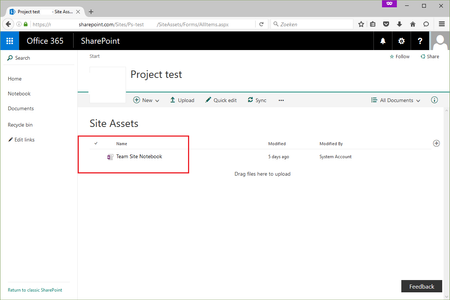
How to rename a document/file stored inside a documentlibrary using Office Dev PnP? I haven't found a cmdlet for it. Specifically I want to rename the OneNote Notebook called "Team Site Notebo...
 Aug 30, 2016
I might be misinterpreting the question, but does this help?
"MoveTo" can be used to rename files.
Connect-SPOnline -url [yoururl]
$ctx = Get-SPOContext
$web = Get-SPOWeb
$file = $web.GetFileByServerRelativeUrl("[your file url]")
$file.MoveTo("[your NEW server-relative url]", 'Overwrite')
$ctx.ExecuteQuery()

DougWare
Sep 01, 2016Brass Contributor
Does that Best Response actually work? My suspicion is that it doesn't because a OneNote notebook isn't a file but rather is a folder. You can use PnP to do that because it is an item in the library, but the easiest thing to do with PowerShell is to use WebDav to treat the library like any other folder, e.g. with Rename-Item. The biggest advantage to using WebDav is that all of your knowledge for dealing with files and folders applies and you can use the same scripts you might already have.

Sep 02, 2016
You are right DougWare.
Charles Willwerth pointed me in the right direction. I was aware about a OneNote Notebook being a folder instead of an item, so I've realised it with this code:
$ctx = Get-SPOContext
$web = Get-SPOWeb
$folder = $web.GetFolderByServerRelativeUrl("/sites/SITEURL/SiteAssets/Team Site Notebook")
$folder.MoveTo("/sites/SITEURL/SiteAssets/MySpecificSiteNotebookName")
$ctx.ExecuteQuery()