Forum Discussion

Aug 29, 2016
Rename a document stored inside a SharePoint document library using Office Dev PnP
How to rename a document/file stored inside a documentlibrary using Office Dev PnP? I haven't found a cmdlet for it. Specifically I want to rename the OneNote Notebook called "Team Site Notebo...
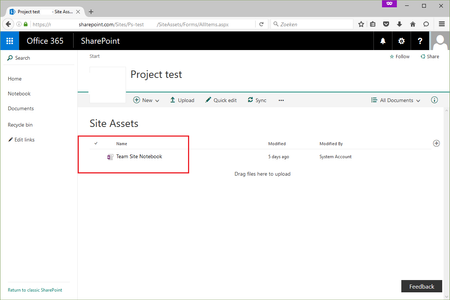
 Aug 30, 2016
I might be misinterpreting the question, but does this help?
"MoveTo" can be used to rename files.
Connect-SPOnline -url [yoururl]
$ctx = Get-SPOContext
$web = Get-SPOWeb
$file = $web.GetFileByServerRelativeUrl("[your file url]")
$file.MoveTo("[your NEW server-relative url]", 'Overwrite')
$ctx.ExecuteQuery()

Aug 31, 2016
I was just surprised that there is not a cmdlet inside the Office Dev PnP library, e.g. Rename-SPOFile($SourceFileName, $DestinationFileName) method, or Move-SPOFile($SourceFileName, $DestinationFileName).
Thanks Deleted and Charles Willwerth for the solutions.
I'm now using the SharePoint Online CSOM based solution of Charles to realize the business requirement.

Aug 31, 2016
Well, PnP is an open source project that can always be improved and extended by the community :-). This might be an opportunity to add a cmdlet for this scenario :-)