Forum Discussion

Aug 29, 2016
Rename a document stored inside a SharePoint document library using Office Dev PnP
How to rename a document/file stored inside a documentlibrary using Office Dev PnP? I haven't found a cmdlet for it. Specifically I want to rename the OneNote Notebook called "Team Site Notebo...
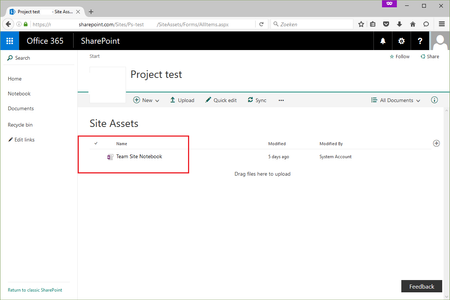
 Aug 30, 2016
I might be misinterpreting the question, but does this help?
"MoveTo" can be used to rename files.
Connect-SPOnline -url [yoururl]
$ctx = Get-SPOContext
$web = Get-SPOWeb
$file = $web.GetFileByServerRelativeUrl("[your file url]")
$file.MoveTo("[your NEW server-relative url]", 'Overwrite')
$ctx.ExecuteQuery()
Charles Willwerth
Aug 30, 2016Brass Contributor
I might be misinterpreting the question, but does this help?
"MoveTo" can be used to rename files.
Connect-SPOnline -url [yoururl]
$ctx = Get-SPOContext
$web = Get-SPOWeb
$file = $web.GetFileByServerRelativeUrl("[your file url]")
$file.MoveTo("[your NEW server-relative url]", 'Overwrite')
$ctx.ExecuteQuery()
Aug 31, 2016
I was just surprised that there is not a cmdlet inside the Office Dev PnP library, e.g. Rename-SPOFile($SourceFileName, $DestinationFileName) method, or Move-SPOFile($SourceFileName, $DestinationFileName).
Thanks Deleted and Charles Willwerth for the solutions.
I'm now using the SharePoint Online CSOM based solution of Charles to realize the business requirement.
- Aug 31, 2016Well, PnP is an open source project that can always be improved and extended by the community :-). This might be an opportunity to add a cmdlet for this scenario :-)
