Forum Discussion

Formatted view - hideColumnHeader not working in list webpart
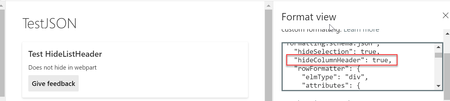

Hi XopherDesign,
Thanks for clarifying. I think this was also fixed with the same change which was done to fix the "hideColumnHeader" property on webpart as I am unable to reproduce this on my test list and looks like everything is working fine.
Kindly re-verify this too at your end once (the final fix can take a week to reach all the production environments).

hello SVaibhav
Sadly, it is still producing the same error. When you are in list view, yes it will show the right formatting when using "hideColumnHeader" but if you embed the list onto a page, that formatting reverts back and shows the Column Headers.
 dfurlerFeb 09, 2020Brass Contributor
Confirmed fixed on my tenant. Thanks!
- SVaibhavFeb 09, 2020Former Employee
Hi HelloWorld15,
As I have mentioned earlier too, the fix can take up to a week to reach all the clients (all production environment). We have already verified this at our end with the internal test sites. Kindly wait for a couple of days and verify the same at your end.
If the problem still exists, feel free to report it back.
Thanks,
Swapnil