Forum Discussion

Vani_metamicro
Jan 31, 2020Copper Contributor
Error: Cannot find module '@microsoft/sp-build-web'
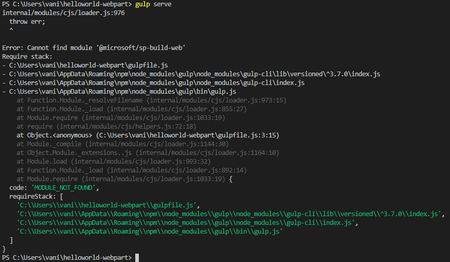
Hello, I have set up the development environment for share point framework and i am trying to run the first application. when i do gulp serve, i get the error message as in the screen shot. Please c...
- Feb 07, 2020
From your picture, I can see that you are using node version 13, which is not currently supported. Download version 10 and that should resolve the issue.


rashics
Jul 23, 2020Copper Contributor
Hi Joel Rodrigues,
Thanks for sharing that proxy issue details, but was not able to solve with it, may be unable to setup proxy settings properly. But now gulp serve issue is solved after installing one file("binding.node") manually from the github site and placed in the node module folder under <path>/helloworld-webpart\node_modules\node-sass\vendor\win32-x64-64
Thank you again for your help.

FreddieS1685
Jul 30, 2021Copper Contributor
rashics hey man, can you share where did you get that "blinding.node" file please?
- rashicsJul 31, 2021Copper ContributorHi FreddieS1685,
You may fine the below location for that binding node file.
https://github.com/sass/node-sass/releases/download/v4.14.1/win32-x64-83_binding.node