Forum Discussion

shanebekker
May 01, 2019Copper Contributor
Format view json not getting date format correct
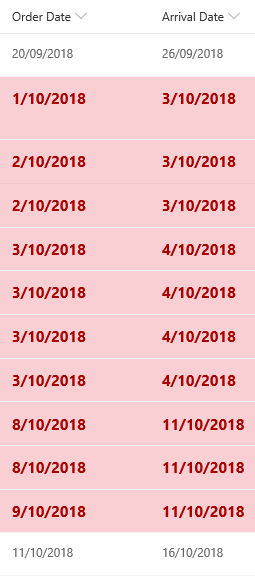
The following Json formatting code gives me the incorrect row highlighting as seen below. Why and how to fix it please. { "schema": "https://developer.microsoft.com/json-schemas/sp/view-format...

Shreyansh Agrawal Microsoft
May 06, 2019Microsoft
Can you try the below?
{
    "schema": "https://developer.microsoft.com/json-schemas/sp/view-formatting.schema.json",
    "additionalRowClass": "=if( Date(toDateString([$Order_x0020_Date])) < Date(toDateString([$Arrival_x0020_Date])),'ms-fontColor-neutralSecondary ms-fontColor-redDark ms-fontSize-mPlus ms-fontWeight-bold sp-field-severity--blocked','')"
}
 shanebekkerMay 06, 2019Copper Contributor
Shreyansh Agrawal Thanks for replying but I still get the same results
- Shreyansh AgrawalMay 07, 2019
Can you share the following details -
- Field type for Order Date & Arrival Date [Date or Calculated Date]
- Are you using SharePoint OnPrem or SharePoint Online
- shanebekkerMay 07, 2019Copper Contributor
Hi,
Using sharepoint lists online and datetime fields
