Forum Discussion

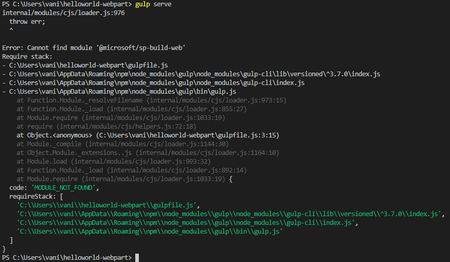
Error: Cannot find module '@microsoft/sp-build-web'
- Feb 07, 2020
From your picture, I can see that you are using node version 13, which is not currently supported. Download version 10 and that should resolve the issue.


Thanks for the reply. i will check the steps again from the documentation.
i will keep you posted 🙂
Hi,
As you said, i am starting to set up the environment from the beginning. When i run the command
npm install -g Pernille-Eskebo/generator-sharepoint
I get the warning as shown in picture. Do you think is this a cause for the errors i received earlier which i shared in the screen shots?
- Feb 07, 2020
From your picture, I can see that you are using node version 13, which is not currently supported. Download version 10 and that should resolve the issue.
 rashicsJul 06, 2020Copper Contributor
I am also getting the same error but my node version is 10.19.0. I am unable to run simple spfx hello-world program. I receive this error while running the gulp serve command after creating the fresh new hello-world program. I have tried to install again the spfx required tools, still the same error.
- Jul 08, 2020
rashics could you provide more information on the steps you are doing until you get the error?
- Vani_metamicroFeb 07, 2020Copper Contributor
- Vani_metamicroFeb 07, 2020Copper Contributor
Hi,
After downloading Node 10, the hello world app is working fine.
Thanks for your guidance and help 🙂