Forum Discussion

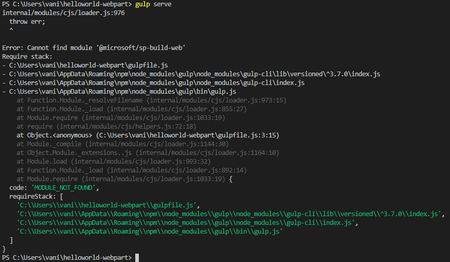
Error: Cannot find module '@microsoft/sp-build-web'
- Feb 07, 2020
From your picture, I can see that you are using node version 13, which is not currently supported. Download version 10 and that should resolve the issue.

Try deleting the node modules folder and run "npm install" again, just in case something went wrong the first time
 Vani_metamicroFeb 06, 2020Tin Contributor
I tried deleting node modules folder and did npm install again. I get the same error.
When i did npm install , i also noticed errors as shown in the screen shot. i doubt, because of those errors, whether the development environment is set up correct or not.
- Feb 06, 2020
Please check the steps from the documentation and ensure that all is in place
https://docs.microsoft.com/en-us/sharepoint/dev/spfx/set-up-your-development-environment
As an example, an unsupported node version is enough to cause issues so I suggest that you carefully follow the documentation as you could have accidentally missed something
- Vani_metamicroFeb 07, 2020Tin Contributor
Thanks for the reply. i will check the steps again from the documentation.
i will keep you posted 🙂