Forum Discussion

Unable to read the file after downloading email attachment using power automate
- Mar 22, 2021
Hi Sameet85
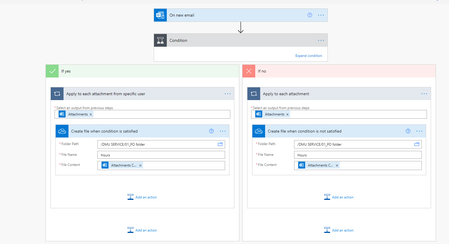
Under File name you appear to be missing the file extension which would cause you issues.
You could test if this is the case by downloading the Hours file your workflow has made and add in an appropriate .extension to test this.
If you are using the same file extension for this flow, then that's fine to add it in (e.g. Hours.docx).
Hope that helps. If not, please write back and I'll take a closer look.
Good luck
Damien

Hi Sameet85
Under File name you appear to be missing the file extension which would cause you issues.
You could test if this is the case by downloading the Hours file your workflow has made and add in an appropriate .extension to test this.
If you are using the same file extension for this flow, then that's fine to add it in (e.g. Hours.docx).
Hope that helps. If not, please write back and I'll take a closer look.
Good luck
Damien

Damien_Rosario Thank you very much Damien. It works perfectly. I realize that the issue is that my file name should have the same file extension/type in order to open it.
I searched the internet and other people seem to use the "Get Attachment" solution but it did not work for me.
Thanks again!
- Damien_RosarioJan 08, 2023Silver ContributorGlad I could help! All the best with your workflows.
Cheers
Damien- Adam_BeaverApr 29, 2025Copper Contributor
Hi Fly_AM I struggeled with the same issue.
Before the step "Create file" a added step "Get Attachement (V2)" - see pic.
