Forum Discussion

Only send an email when a specific column in a list changes
- Nov 15, 2023
Hi u156531,
yes, you can narrow down the trigger conditions in Power Automate to respond only to changes in specific columns. Here are the steps you can use:
Begin by opening Power Automate and selecting "Create Flows" followed by "Automated from Blank." Choose the trigger "When an item is created" and proceed to create the flow.
In the trigger action, click on the three ellipses to open a side pane, then select "Settings."
Scroll down to find the "Trigger Condition" option.
In the trigger condition, define the condition for checking the information in a particular column using the following syntax: @equals(triggerBody()?['Column name'],'Value'). Replace 'Column name' and 'Value' with the actual column name and the value you want to check.
Once you've specified the condition, click on "Done."
By following these steps, the flow will only be triggered when the specified column is modified. Ensure you change the status at the beginning of the flow to prevent potential loops.
If you need the column name, you can find it in the site settings by clicking on the column name.
Here is the link you can use as a reference:
Solved: Triggering flow only on specific Sharepoint column... - Power Platform Community (microsoft.com)Please click Mark as Best Response & Like if my post helped you to solve your issue.
This will help others to find the correct solution easily. It also closes the item.If the post was useful in other ways, please consider giving it Like.
Kindest regards,
Leon Pavesic
(LinkedIn)


Hi LeonPavesic, i'm trying to apply your solution but it doesn't work for me and I don't know if I'm doing something wrong. Here my test
Whether the value of the STATUS field changes or any other field in the SP list changes the next step is executed (i.e. sending the email).
In this case the only field modified was "NOTAAPPROVATORI" and not STATUS. I hope you can help me
Kindest regards,
Roberto

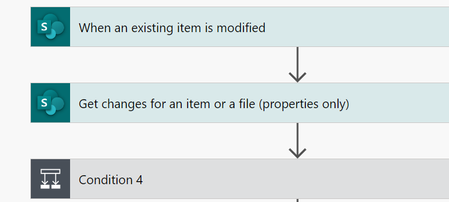
roanamyou are using the wrong trigger and your flow is missing some steps. You need to use "when an item or a file is modified" ("quando un elemento o un file viene modificato"?) then "get changes for an item or a file (properties only)" followed by a condition to check if that particular column has changed.
Rob
Los Gallardos
Microsoft Power Automate Community Super User.
Principal Consultant, SharePoint and Power Platform WSP Global (and classic 1967 Morris Traveller driver)