Forum Discussion

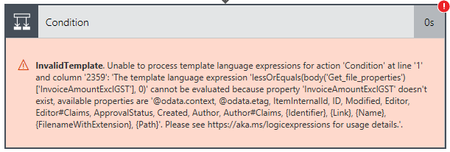
Do Until - Get File Properties ... Invalid Template ...
- Mar 27, 2018
I think i've solved it and discovered that this is what coalesce is for. Here is my working Do Until condition without needing to assign default values to the columns in the library:
@and(not(empty(body('Get_file_properties')?['Approver'])),not(equals(coalesce(body('Get_file_properties')?['InvoiceAmountExclGST'], '0'), '0')),not(equals(coalesce(body('Get_file_properties')?['InvoiceDate'], '19000101'), '19000101')),not(equals(coalesce(body('Get_file_properties')?['InvoiceFrom'], 'Nobody'), 'Nobody')),not(equals(coalesce(body('Get_file_properties')?['InvoiceNumber'], '0'), '0')))If i understand coalesce correctly, the fallback value could be any string value. I just chose values that kind of made sense for the type of each column.
The Do Until > Get file properties loop now keeps looping until all the required fields are populated. Without generating the InvalidTemplate error.
I'll mark this as solved and hope someone finds this useful.
Ian.

While I don't really understand why, I think that I've at least got a workaround for my template error problem.
It seems that 'Get file properties' action and 'When a file is created (properties only)' trigger do not output columns that have no data in them. Except if the column is a person/group column.
For example, when initially constructing my flow, my condition step only tested whether the 'Approver' column was empty. My flow worked because the 'Approver' column is output by the 'When a file is created' trigger and the 'Get file properties' action even though it is blank/empty. However, when I put my 'InvoiceAmount', 'InvoiceFrom' or 'InvoiceDate' columns in the condition, I get the TemplateError because the columns are not available in the output of 'Get file properties' action. But when I put a default value in the 'InvoiceAmount' etc. columns, they appear in the 'Get file properties' action output and I don't see the TemplateError.
This is not desired behaviour as I would like the person adding an invoice to be prompted for the required fields before the invoice is sent for approval. However, I can workaround by assigning default non-sensible values to the columns. Then test these in my condition and only send the invoice for approval once the columns have different values. Which are hopefully more sensible values.
I'm probably still bit of a noob at this stuff :) but I'm learning. Is there a way to test if the column exists in the output before testing the value? Is this what the 'coalesce' function is for?
Ian.