Forum Discussion

bvenhaus
Dec 14, 2021Copper Contributor
The ms-appinstaller protocol has been disabled.
I just found out that users can no longer install my MSIX from my website. This is a WPF application packaged with "Windows Application Packaging Project" (wapproj). When users click the "Get the app...
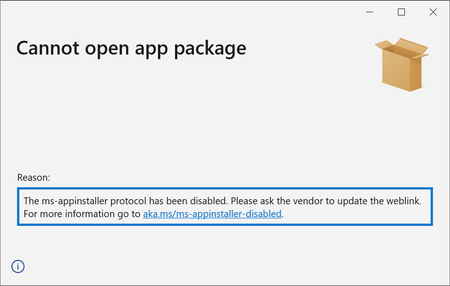
 Dec 15, 2021
bvenhaus Thank you for your question. We removed the ms-appinstaller custom scheme due to a security vulnerability. We do intend to bring this back, and are working on it. For now, you can update the link on your website by removing 'ms-appinstaller:?source='
<html>
    <body>
        <h1> MyApp Web Page </h1>
        <a href="http://mywebservice.azureedge.net/HubApp.msix"> Install app package </a>
        <a href="http://mywebservice.azureedge.net/HubAppBundle.msixbundle"> Install app bundle  </a>
        <a href="http://mywebservice.azureedge.net/HubAppSet.appinstaller"> Install related set </a>
    </body>
</html>
Aditi_Narvekar Microsoft
Dec 21, 2021MicrosoftHi all,
To confirm, yes, we do plan on correcting this. I know the team is working on bringing it back, but don't have a date for this yet.
To confirm, yes, we do plan on correcting this. I know the team is working on bringing it back, but don't have a date for this yet.

Grufus
Dec 23, 2021Copper Contributor
Thanks for the update Aditi! We have had a critical issue open with Microsoft premiere support for over a week, and unfortunatly have gotten nowhere except links to articles about workarounds, so at least your responding here. At this point we are having to figure out ways around this issue and abandon this funtionality (probably for good). It is a shame though as it worked very well for quite a while.
 27k1ismsDec 24, 2021Copper ContributorIf you have a workaround which is feasible it would be good to know. I doubt a good solution exists.
 MikeHDec 24, 2021Brass ContributorThe workaround is for users to download the XML file and open it. If you need the custom parameters then there's no workaround.
If you don't need custom parameters then it's worth maybe taking a deep breath and looking at the actual UX change. Before:
1. Click the link.
2. Click the yes button in "Open this link in App Installer?"
3. Click Install/Launch in App Installer.
After:
1. Click the link. It downloads.
2. Click the download in the browser. App Installer opens.
3. Click the Launch/Install button.
Same number of clicks. The URL handler _is_ better because it has more features, because the permission to open URLs is remembered per site, because URLs work in more places, because it doesn't clutter the user's downloads folder and so on. So we all hope it'll return. But, for distribution via a web page, the difference isn't that large. tomcrevierDec 24, 2021Copper ContributorMikeH Thanks for the details! How do automatic updates work with the workaround? Do they still happen automatically or does the user need to go download the installer manually?
Tom