Forum Discussion

SuperPuTTY MSIX And Windows Notepad Integration
- Oct 16, 2026
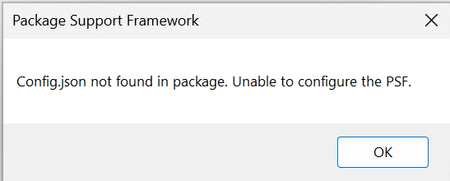
Crazylarry Notepad is itself another msix app and will be running in a different container that doesn't have a config.json file - causing this error when the parent injects the psfruntime.dll into it.
Inside the config.json file of your package, you can add an extra process entry for notepad.exe that, in essence, says don't do the injection when the new process has that name. Just copy the entry you see for psflauncher, paste and change the name. i.e.
{
"executable": ".*_PsfLauncher.*"
},
{
"executable": ".*Notepad.*"
},
You would use the regex ".*Notepad\\.exe$" if you want to exclude Notepad.exe but not Notepad++.exe


The screenshot identifies a PSF configuration-loading error, not a sessions.xml parsing error. However, it does not prove that Notepad is simply searching its own executable directory. Microsoft's documented layout places config.json at your package root and separates application launch settings from process-specific fixup configuration. First verify the installed package actually contains that root configuration, that the application ID matches the manifest, and that the launcher, runtime and fixup files have compatible architectures. Next capture a Process Monitor trace of the failing command, including the exact Notepad executable path, config.json lookup and loaded PSF modules. Compare this with launching your configured alternative editor. Review process matching so fixes intended for SuperPuTTY are not unnecessarily applied to unrelated processes. Do not copy configuration into Windows system directories. If the package layout is correct, provide the sanitized configuration, PSF version and trace for a targeted PSF investigation

Thanks for your reply. Procmon shows that Notepad is indeed looking for config.json in it's own root directory when it shouldn't be. I think what's needed here is some way of telling the PSF not to apply fixes to sub-processes of processes that have been remediated. Maybe TIMOTHY_MANGAN can shed some light on it.
- Oct 16, 2026
Crazylarry Notepad is itself another msix app and will be running in a different container that doesn't have a config.json file - causing this error when the parent injects the psfruntime.dll into it.
Inside the config.json file of your package, you can add an extra process entry for notepad.exe that, in essence, says don't do the injection when the new process has that name. Just copy the entry you see for psflauncher, paste and change the name. i.e.
{
"executable": ".*_PsfLauncher.*"
},
{
"executable": ".*Notepad.*"
},
You would use the regex ".*Notepad\\.exe$" if you want to exclude Notepad.exe but not Notepad++.exe
- CrazylarryOct 17, 2026Brass Contributor
Great stuff. Many thanks TIMOTHY_MANGAN