Forum Discussion

PSF FileRedirectionFixup not working as intended?

Darren_Hoehna , so normally it would. When the application starts, it checks to see if there's an INI file, if it doesn't exist then it creates one.
If one exists, but is blank (no meaningful data no connection strings) it brings up a configuration screen upon startup that asks the user to fill in database server, db, auth information. We don't want this at all. However, if I include an INI that has prepopulated strings and database information in it (which would be different for every customer) it poses a problem.

 Microsoft
I see. So, what you want PSF to do is to find the ini file is ProgramFilesX86/ApplicationData, right?
The FRF works differently than what we naturally think as redirection.
FRF takes the path we want to redirect and PSF takes care of the redirection for us. An example from your configuration file.
{
                                    "base": "VFS\\ProgramFilesX86\\IMPAC\\METRIQ",
                                    "redirectTargetBase": "C:\\IMPAC\\METRIQ",
                                    "patterns": [
                                        "IMSPHospital\\.ini"
                                    ]
                                },
This is telling PSF to redirect all file operations in VFS\ProgramFilesX86\IMPAC\METRIQ to C:\IMPAC\METRIQ for all files that match the pattern IMSHospital\.ini.
What we want to do is tell PSF to redirect all file operations in ProgramFilesX86\ApplicationData that match the pattern IMSHospital\*.ini.
Because ProgramFilesX86 is a known folder I would suggest to use the known folder options instead.
Your configuration would look like this.
"config": {
    "redirectedPaths": {
        "knownFolders": [
            {
                "id": "ProgramFilesX86",
                "relativePaths": [
                    {
                        "base": "ApplicationData\\IMSHospital",
                        "patterns": [
                            ".*"
                        ]
                    }
                ]
            }
        ]
    }
}
Can you please try that and get back to me?
- John WildesAug 11, 2020Brass Contributor
Darren_Hoehna , thanks for the help.
It's not working. I now get an endless loop error from the application. Where is it supposed to end up writing when I do this?
- John WildesAug 11, 2020Brass Contributor
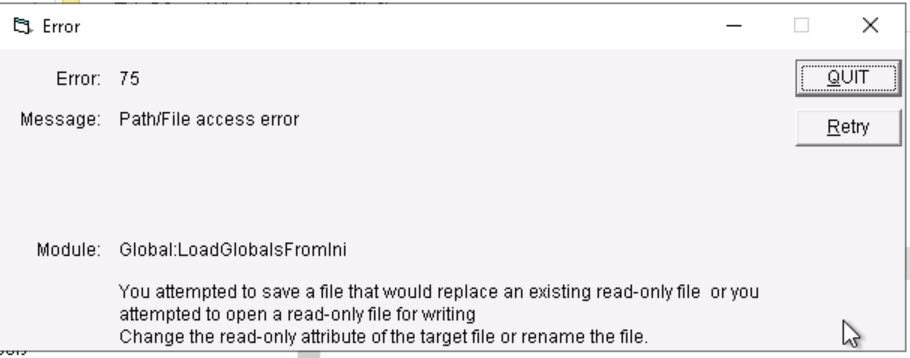
Darren_Hoehna when I do this I get this combination of error.
Error 1 is I'm assuming when the application sees that there's no .ini file in the C:\Program Files(X86)\IMPAC\METRIQ folder and attempts to create it. With the redirection in place I was hoping this would see no INI and then would attempt to write it to the "writable" end user %APPDATA% location.
Error 2 is because it can't log an error to the ErrLog and trying to write the INI file again.
I have to use taskmanager to kill the processes.
I've also copied the config.json file I'm using, again maybe I'm doing something wrong.
{
    "applications": [
        {
            "id": "HOSPITAL",
            "executable": "VFS/ProgramFilesX86/IMPAC/METRIQ/HOSPITAL.exe",
            "workingDirectory": "VFS/ProgramFilesX86/IMPAC/METRIQ"
        },
        {
            "id": "IMSMAX",
            "executable": "VFS/ProgramFilesX86/IMPAC/MOSAIQ Connect/IMSMAX.exe",
            "workingDirectory": "VFS/ProgramFilesX86/IMPAC/MOSAIQ Connect"
        }
    ],
    "processes": [
        {
            "executable": "HOSPITAL",
            "fixups": [
                {
                    "dll": "FileRedirectionFixup32.dll",
                    "config": {
                        "redirectedPaths": {
                            "knownFolders": [
                                {
                                    "id": "ProgramFilesX86",
                                    "relativePaths": [
                                        {
                                            "base": "ApplicationData\\IMSHospital",
                                            "patterns": [
                                                ".*"
                                            ]
                                        },
                                        {
                                            "base": "ApplicationData\\ErrLog",
                                            "patterns": [
                                                ".*"
                                            ]
                                        }
                                    ]
                                }
                            ]
                        }
                    }
                }
            ]
        }
    ]
}
There's no APPLICATIONDATA directory listed in the MSIX package that I have.
- Darren_HoehnaAug 12, 2020
You made the configuration file correct. You're all good there. 🙂
Thank you for trying out my suggestion. We'll get to the bottom of this issue and make your app work.
I'm going to type out my thought process here.
The configuration tells PSF to redirect all file operations in ProgramFilesX86\ApplicationData\[IMSHospital|ErrLog]
When the application looks for the .ini file in C:\Program Files X86\ApplicationData\IMSHospital\*.ini PSF will intercept that call and look at call the same method the application called, just in the redirected location.
The same happens when the call is made to make the file. PSF will intercept the call and redirect the createfile call to the redirected location.
From the error messages you attached (Thank you for attaching them) it seems like the application was able to find the ini file but the file is read-only. The error you are getting is that the application does not have permission to write over the file.
What I am confused about is why you got the "can't write over a file that is read-only." Your original configuration file didn't specify that the ini file is read-only. My guess is maybe the application writes the file as read-only.
Here is how we will continue.
1. We need to make sure PSF is being called. Is "PSFLauncher32.exe" listed as the executable for the application?
2. Maybe we are getting this error because the ini file is read-only. To test, could you please remove the ini file before you execute the application?
Thanks,
Darren.