Forum Discussion

HumanMusic
May 26, 2023Copper Contributor
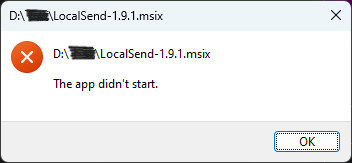
Opening the msix file results in an error: "The app didn't start."
But Appinstaller start normally when I switch to Administrator User.
 Dec 27, 2023
Found the perfect solution below.
https://answers.microsoft.com/en-us/windows/forum/all/solved-when-i-try-to-open-any-appx-or-appinstaller/cf339756-1dfb-453f-bbf8-52fbbecffdc5
HumanMusic
May 30, 2023Copper Contributor
I did report it.
The exe file working normally.
The exe file working normally.

Reza_Ameri
May 30, 2023Silver Contributor
Glad you reported it.
Have you run the above commands?
If yes, what was the result?
Are you facing the same issue if you boot into Clean Boot?
Have you run the above commands?
If yes, what was the result?
Are you facing the same issue if you boot into Clean Boot?
- HumanMusicJun 03, 2023Copper ContributorI already did. But it can be open normally under Administrator User.
 PCNDATAJun 03, 2023Copper ContributorNew MSIX install package has been created, please download it from
https://github.com/localsend/localsend/releases/download/v1.10.0/LocalSend-1.10.0-windows-x86-64.msix maybe this will solve your problem.- Reza_AmeriJun 03, 2023Silver ContributorIf possible, try create a new user and login with the new user and see if it works?
- HumanMusicJun 03, 2023Copper ContributorUnfortunately, it's not working. The msix file still cannot be opened after clean boot.
- Reza_AmeriJun 02, 2023Silver ContributorThank you for the update, please share the result of Clean Boot.
Note, when you run Clean Boot, it keep your files and data and just disable services and you may enable them later. - HumanMusicJun 02, 2023Copper ContributorWindows PowerShell
Copyright (C) Microsoft Corporation. All rights reserved.
Install the latest PowerShell for new features and improvements! https://aka.ms/PSWindows
PS C:\Users\Administrator> DISM /Online /Cleanup-Image /CheckHealth
Deployment Image Servicing and Management tool
Version: 10.0.22621.1
Image Version: 10.0.22621.1778
No component store corruption detected.
The operation completed successfully.
PS C:\Users\Administrator> DISM /Online /Cleanup-Image /ScanHealth
Deployment Image Servicing and Management tool
Version: 10.0.22621.1
Image Version: 10.0.22621.1778
[==========================100.0%==========================] No component store corruption detected.
The operation completed successfully.
PS C:\Users\Administrator> DISM /Online /Cleanup-Image /RestoreHealth
Deployment Image Servicing and Management tool
Version: 10.0.22621.1
Image Version: 10.0.22621.1778
[==========================100.0%==========================] The restore operation completed successfully.
The operation completed successfully.
Haven't tried Clean boot yet.