Forum Discussion

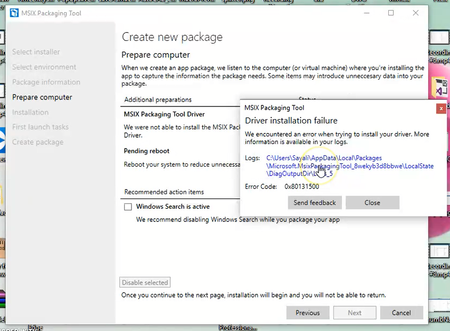
Error getting MSIX Packaging Tool Driver

 Microsoft
Hello,
Failure to install the packaging driver is often caused by issues with your Windows Insider settings.
You can find more information about common configuration issues here:
https://docs.microsoft.com/en-us/windows/msix/packaging-tool/mpt-known-issues
Thanks!
James

I have found that the driver will fail to install in this way if the VM does not have access to the internet. I'm not sure why that is the case; being connected to a local network is not enough.
If you need to package in an offline VM, you should connect it to the internet, start packaging to the point that the driver gets installed and then cancel. You can then take your snapshot and be disconnected from then on.
- jvintzelJan 11, 2019Former Employee
We actually have the individual FOD cab published to download. All the details and a few different approaches to offline install are available here: https://docs.microsoft.com/en-us/windows/msix/packaging-tool/mpt-known-issues#msix-packaging-tool-driver-considerations
- James PikeJan 10, 2019
Feature on demand packages, such as the packaging tool driver, are fetched on demand from Windows update servers. See https://docs.microsoft.com/en-us/windows-hardware/manufacture/desktop/features-on-demand-v2--capabilities for more details. Thus the need for an internet connection as Tim identified.
If you are working with offline VMs, you can also review the "Installing MSIX Packaging Tool driver FoD in WSUS" section of the workarounds page to get information on pre-downloading a copy of the FoD package. You can then preinstall the driver on your VM to avoid any need to attach the VM to the internet!
Thanks!
James
