Forum Discussion

 Microsoft
Preview exited, now GA: PowerPoint Presenter View in Teams
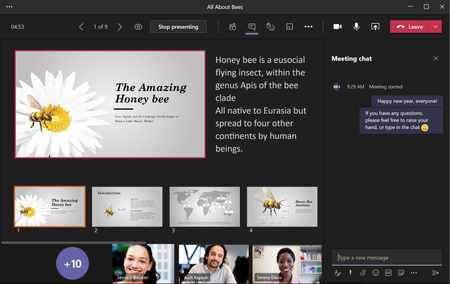
- Feb 13, 2021
For everyone asking for a way to toggle presenter view, thank you for your feedback! We feel your pain and are addressing it with a quick mitigation via a keyboard shortcut for now: try clicking in the slide area, and press "Ctrl+Shift+X". The notes and thumbnail strip should be closed. Using the same keyboard shortcut key again can bring the presenter view back. This update will be available in a day or two.
At the same time, we are also working on hiding the presenter view by default on devices with small screen. It will be available soon.
Again, thank you for being a part of public preview and helping us make the product better!
 Microsoft
Hi KennyJcc, Interesting.. Did this work for you before? What device are you on? (Mac, Windows?)

Emily Kirby
This is on a windows running win10, laptop. I haven’t seen this reported by anyone else and so seems quite strange behaviour. It almost feels like the functionality is there but not showing. I don’t know if this is normal behaviour but if I log on Teams via the web the functionality works as expected, just not using the Teams desktop app.
- Tony StevensMar 02, 2021Brass Contributor
They mentioned automatically disabling this feature for smaller screens with lower resoloutions. If you've got 12" laptops with 720p displays, that may be the cause.
- KennyJccMar 02, 2021Copper ContributorThanks Tony. I saw this but no I have a larger 15” plus I have a larger monitor and still the same result.
 YVogiatzisMar 02, 2021Copper Contributor
Well, this is weird. Yesterday, I was able to toggle the presenter view on and off with Ctrl+Shift+X, but it seems to have stopped working. I am working (teaching) on a laptop, but I have to say that this function was really helpful, although the slides appeared quite small. In some classes, being able to view the following slides was very useful for me (and the notes also, in some cases). Being able to control the flow of the presentation, instead of searching for the slide that I wanted to move to is essential for the experience of both the students and the instructor. And since I was able to switch the presenter view on and off at will, there was no problem with the size of the slides. And I really do not like sharing the powerpoint window or -worse- the whole screen , since it just complicates things. I guess that just adding the option to use this feature or not would solve this problem.
 Mowbs8Mar 02, 2021Copper Contributor
I'm not seeing notes or thumbnail slides - I've just checked my status and it says DEVELOPER, will it work?