Forum Discussion

 Microsoft
In public preview: Meeting co-organizer
- Mar 10, 2022
Currently, the co-organizer feature doesn't support breakout rooms. Here is a temporary workaround for adding your Co-Organzier as a Breakout Room Manager, until it's fully supported:
BEFORE A MEETING
-
Organizer creates meeting
-
Organizer opens the meeting on their Teams calendar & adds Breakout Rooms (BR) to it
-
BRs shows up as a new tab along with other apps added to the meeting
-
Organizer then uses BR app's settings to assign a person invited to the meeting as a BR manager
-
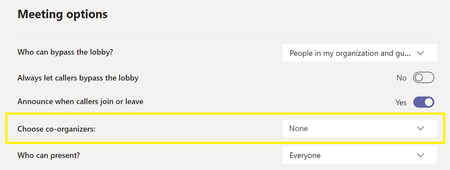
Organizer opens meeting options and assigns meeting co-organizer role to that same person
DURING MEETING
-
Imagine that organizer is out of office that day (like in a substitute teacher scenario)
-
The co-organizer joins the meeting & they have all the capabilities of co-organizer role
-
The co-organizer starts the BR in the meeting
-
When co-organizer joins the BR, they no longer have the co-organizer role but since that person was assigned as a BR manager, they can manage the BR with all capabilities of a BR manager (their role essentially changed from "co-organizer" to "BR manager")
-
Once BR session is over, BR manager & other attendees will leave the BR and rejoin the main meeting
-
When they rejoin the main meeting, everyone is automatically assigned their original meeting roles for the main meeting
-
So, the original co-organizer who filled the BR manager role during the breakout room session automatically becomes a co-organizer in the main meeting once again
-


Hi Emily Kirby - thank you for keeping us updated. Can you tell us whether or not the ability to broaden a co-organizer's role to include any/all of the following fall in to those "gaps" and "current limitations" categories? I would like to know if they might be available at some future date.
Create & manage breakout rooms
View & download attendance reports
Manage the meeting recording
Edit the meeting invitation
Remove or change the Organizer role
Thank you for your communications and updates!

- Jon_FerraezAug 26, 2022Brass Contributor
I agree with the prior few comments above this. As a meeting co-organizer you cannot "Edit the meeting invitation" as that function of a Teams meeting co-organizer role was not addressed in the GA - August 18, 2022 Teams release, for anyone testing this function again. You have no rights to edit the meeting details, to remove or add someone or cancel a single occurence of a meeting, you have to get the single meeting "owner" to do it (the user that originally created the meeting). Teams needs to have multiple organizers and not just co-organizers. Most large or even small organizations have a chain of authority to allow people to make decisions and change things and not have a single owner of an object that is the only one that can control things. We need to be able to change a detail of an existing meeting at any moment and in a timely manner in case the owner is not present, to add or delete someone from a meeting or cancel a single occurence of a meeting. None of things items can be done as a co-organizer of a meeting in the GA release version of Teams that added co-organizer around August 18, 2022.