Forum Discussion

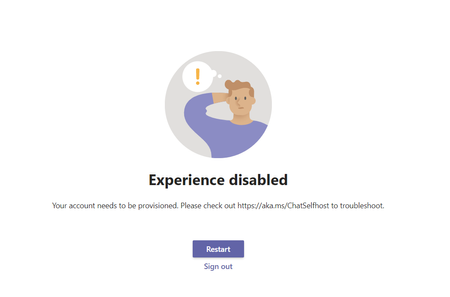
New Teams Preview -> Experience disabled

 Microsoft
Hi Marcel,
Many thanks for your feedback! I assume, that you've opened a new Microsoft Teams (Preview) app which is pre-installed on Windows 11. If that's the case, you need to sign-in with your personal Microsoft account (for example: user@outlook.com), because Work or School accounts i.e. organizational accounts like those from AAD are currently disabled in this preview version.
In order to use your Organizational account (Work or School account), you will have to install side by side Microsoft Teams app from My account (office.com) or ask your IT to provision it for you. If that's enabled by admin, you will also get preview features related to Work or School accounts there.
Please let us know if this helped.
Many thanks.
Kind regards,
Vladimir

thank you for the Hints. - Iám the Globale Administrator of our Tendant. - But i cannot find out where i can Enable the new Preview, On the https://portal.office.com/account/?ref=MeControl#installs i can only download Office.. But there is no Info abount Teams.
i Have Installed the Preview Version of Teams on my Windows 10 PC, but i think i need the Info where in the Team Admin Center is can Enable this Version.
Best Regards,
Marcel
 RikkyCitraSep 16, 2021Brass ContributorTry this
open https://admin.teams.microsoft.com/
then follow this https://docs.microsoft.com/en-us/MicrosoftTeams/public-preview-doc-updates
then this https://support.microsoft.com/en-us/office/get-early-access-to-new-teams-features-a6e387fe-1cad-4f90-ad78-1a311c77b36d
hope this help- free2kSep 17, 2021Copper ContributorHi, thank you, on this step am already... 🙂 - I can use the Public Preview version; but this is not the "New" Version that shipped with Windows 11.
( Team 2.0 that Based on Edge Webview 2) that i want to try with my Tendant... - But it seem thats it only avaible for consumer not for business accounts.
Best Regards,
Marcel- RikkyCitraSep 17, 2021Brass Contributor
If you mean the Teams that's integrated in win 11, then seems that we cannot login with business account yet. I have tried it before as I am in win 11 beta. Hopefully when win 11 is available for public, we can use business account with win 11 native Teams app to full functionality.