Forum Discussion

Kaushal-Mehta Microsoft
Jan 28, 2022MicrosoftIn public preview: Meeting co-organizer
Description
Organizers will now be able to share control by assigning the new "Co-organizer" role to people they invite. Co-organizers will have almost all of the capabilities of the organizer, inc...
- Mar 10, 2022
Currently, the co-organizer feature doesn't support breakout rooms. Here is a temporary workaround for adding your Co-Organzier as a Breakout Room Manager, until it's fully supported:
BEFORE A MEETING
-
Organizer creates meeting
-
Organizer opens the meeting on their Teams calendar & adds Breakout Rooms (BR) to it
-
BRs shows up as a new tab along with other apps added to the meeting
-
Organizer then uses BR app's settings to assign a person invited to the meeting as a BR manager
-
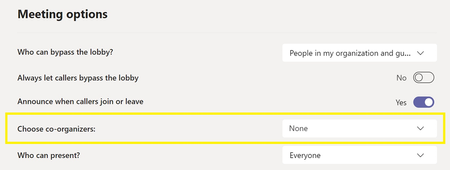
Organizer opens meeting options and assigns meeting co-organizer role to that same person
DURING MEETING
-
Imagine that organizer is out of office that day (like in a substitute teacher scenario)
-
The co-organizer joins the meeting & they have all the capabilities of co-organizer role
-
The co-organizer starts the BR in the meeting
-
When co-organizer joins the BR, they no longer have the co-organizer role but since that person was assigned as a BR manager, they can manage the BR with all capabilities of a BR manager (their role essentially changed from "co-organizer" to "BR manager")
-
Once BR session is over, BR manager & other attendees will leave the BR and rejoin the main meeting
-
When they rejoin the main meeting, everyone is automatically assigned their original meeting roles for the main meeting
-
So, the original co-organizer who filled the BR manager role during the breakout room session automatically becomes a co-organizer in the main meeting once again
-

Emily KirbyMicrosoft
Apr 13, 2022MicrosoftWe have figured out the issue with getting this feature to work in Public Preview. It is now 100% available! Please try it out and give us feedback.
Regarding the feedback about the current limitations, we are aware of the gaps and will be working to close them.
Regarding the feedback about the current limitations, we are aware of the gaps and will be working to close them.

JGrodin
May 11, 2022Copper Contributor
After enabling Public Preview, I still don't see the "Choose co-organizer" option in my meetings options page. It's a recurring weekly meeting I setup some time ago. Will the option only show up on meetings that I create after enabling public preview?