Forum Discussion

Mitre information missing from incident
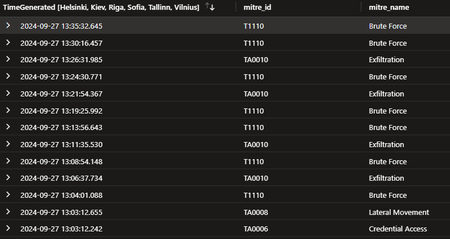

Maybe I misunderstand your answer but my initial post show what's seen by sentinel in the alert. In the analysis rule I've tried with with the column holding the Mitre ID or the Mitre name and neither work. The respective columns are visible and selectable without error in the analytics rule.

So if we use this as and example
Alert from {{Mitre_id}}
Do you just get the "Alert from " part in the Name / Description? Or do you get nothing?
https://learn.microsoft.com/en-gb/azure/sentinel/customize-alert-details?tabs=azure#how-to-customize-alert-details
- TheHoff70Sep 29, 2024Brass Contributor
Ah, now I understand. I've configured Alert Description to include the variables for Mitre ID and name and these are visible in the incident description, as shown below (some data deleted) but not as the Tactics or Techniques for the whole incident.
Update: I've dug around in the documentation for the security platform sending to Sentinel and it seems it doesn't operate with Tactics, it is only able to send Techniques.
- TheHoff70Sep 30, 2024Brass Contributor
I've always felt it to be cheesy to answer ones own question but since I've made sort of a breakthrough I needed to point it out for anyone else trying to integrate external Mitre into Sentinel.
It seems Sentinel will access dynamic Mitre Tactics by name as long as I remove any spaces in the name. For example "Credential Access" is seen throughout Sentinel but isn't accepted if it's parsed in that form by my analytics rule. "CredentialAccess" is ok and show up in the incident.
Regarding techniques I haven't been able to map those yet, regardless if I send in the ID in the form of TIxxx or the related name without spaces.
/Fredrik