Forum Discussion

Issue when ingesting Defender XDR table in Sentinel
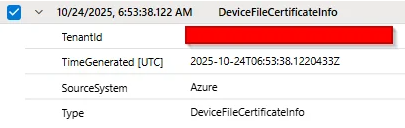

Hi Lucas,
A couple of things to check because what you’re showing (rows where only TimeGenerated / TenantId / SourceSystem / Type are populated and everything else is null) usually points to either no underlying MDE telemetry, or a schema/stream mismatch in the workspace transformation DCR.
First confirm the tables actually have data in Defender XDR (source of truth)
Both DeviceImageLoadEvents and DeviceFileCertificateInfo are MDE-populated advanced hunting tables. If Defender for Endpoint isn’t generating those event types (or the tenant/devices don’t produce them), the queries will return no results.
In the Defender portal Advanced Hunting, can you confirm these return recent results?
KQL
DeviceImageLoadEvents
| where Timestamp > ago(1d)
| take 5;
DeviceFileCertificateInfo
| where Timestamp > ago(1d)
| take 5;
If these are empty in Defender, Sentinel won’t be able to “invent” the missing fields/events. So the fix is on the endpoint telemetry side.
Verify the Sentinel Defender XDR connector is collecting those specific tables
In Sentinel go to the Microsoft Defender XDR connector → Connect events, both tables are explicitly supported/collectable. Make sure they’re checked/enabled there.
If you followed Jeffrey’s “route to Data Lake via workspace transformation DCR” approach: validate the outputStream and custom table schema
If the outputStream points to a table name that doesn’t exist / doesn’t match / isn’t declared correctly, it’s very common to end up with records landing without the expected columns, or columns being dropped during ingestion. As a reminder, streams for custom tables must follow the Custom-<TableName> format.
And workspace transformations are applied via a workspace transformation DCR (only one per workspace), so one bad mapping can affect just specific tables/streams.
Things I’d double-check:
- The custom table exists and has the full schema (not just the default columns)
- The DCR dataFlows entry matches the table exactly, e.g. outputStream: "Custom-DeviceImageLoadEventsDL_CL" (and the table is DeviceImageLoadEventsDL_CL)
- No accidental transformKql is projecting away columns
Quick sanity checks in Sentinel/LAW:
KQL
// do we have “real” payload fields populated?
DeviceImageLoadEvents
| where TimeGenerated > ago(1d)
| summarize Total=count(), WithDeviceId=countif(isnotempty(DeviceId))
DeviceFileCertificateInfo
| where TimeGenerated > ago(1d)
| summarize Total=count(), WithDeviceId=countif(isnotempty(DeviceId))
Turn on DCR diagnostics and look for ingestion/transform errors
If this is a DCR routing/schema issue, the fastest way to confirm is enabling diagnostics on the DCR and checking error logs (often surfaced as DCR error tables/logs).
If you can share whether the tables have data in Defender Advanced Hunting and a snippet of the relevant workspace transformation DCR dataFlows for these two streams, it’ll be easier to pinpoint whether this is telemetry-related vs a mapping/schema drop.
Vighnesh.