Forum Discussion

Sidra_Raza
Nov 23, 2023Brass Contributor
Azure SQL Database connector is not showing as connected
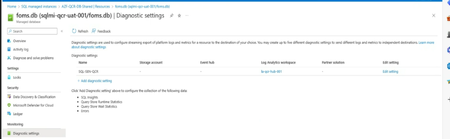
Hello everyone, I have integrated SQL database & SQL manage instances to sentinel through diagnostics settings, I send logs categories as follows: SQL Insights, Query Store runtime Statist...

Clive_Watson
Nov 24, 2023Bronze Contributor
Hello, What does the Data connector screen look like? If any data is being received you should get a green Bar in the top left and the status will be "connected". Then the Datatypes that have sent data in the last 7days only are shown (look at the code in Log Analytics by clicking the button). Its normal that you might only have one or more data types at any time.

Sidra_Raza
Nov 24, 2023Brass Contributor
- Clive_WatsonNov 24, 2023Bronze Contributor
Is that maybe the older version in the Data Connectors blade? The latest is found in the [Content hub] Version 2.0.2:
- Sidra_RazaDec 01, 2023Brass ContributorI have installed the latest version of SQL Database connector but the connector is still showing as disconnected.
- Clive_WatsonDec 03, 2023Bronze ContributorDo you have any data now (even if the connector is showing as disconnected)?
- Sidra_RazaNov 26, 2023Brass Contributor
I will check the version and get back to you.
One more Question: How we can integrate SQL virtual machine through diagnostics setting? Do we need to do some sort of configuration on the SQL VM?
I don't have the diagnostics setting in the left bar.
- Clive_WatsonNov 27, 2023Bronze ContributorGenerally if its a VM, you'd add the AMA agent or use Defender for SQL Servers https://learn.microsoft.com/en-us/azure/defender-for-cloud/defender-for-sql-usage