Forum Discussion

The dreaded App@SharePoint user name problem
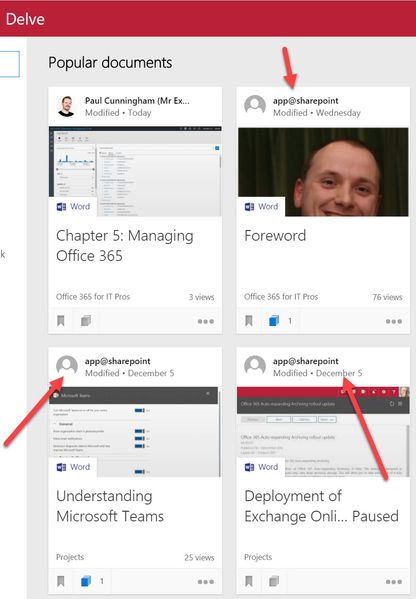

no feedback yet from Microsoft Support.

Depressingly the norm for this issue...
- Ivan54Feb 07, 2017Bronze Contributor
Hey TonyRedmond,
Here's another juicy bit information, though I'd take with a grain of salt, as I've gathered some additional information on how this error is related to the new and old Delve entry points, see this thread: https://techcommunity.microsoft.com/t5/Delve/Anyone-also-seeing-app-sharepoint-com-in-Delve/m-p/34684/highlight/false#M209
Here's the latest support response:
Please know that I received updates from the Production Group, that specify the following:
“This is one System account, that normally is used when the customer sets up, one App, and provides that App a high level permission to run on the SharePoint Site. In this particular case, an App was probably created, or set up, or even for example a workflow and was given an Elevated Permission, on the SharePoint Site, and because of that, the account is shown as the last one that modified the documents. So the customer needs to look for all Apps he has on SharePoint, and see which one has this high level permission. This can be the reason that this account is showing up.”
In my case I don't have any additional apps allowed for the documents affected on that site, so I'm sure the statement is inaccurate.
- TonyRedmondFeb 08, 2017MVP
This is getting pretty silly as the quality of the answers from support is now dubious at least and possibly misleading at worst.
It would be nice if someone like Dan Holme could throw light into this dark corner of Delve...
- Ivan54Feb 14, 2017Bronze Contributor
And there goes my confidence in the Office 365 support down the drain:
I would like to follow-up on this case. As I mentioned in my previous email, his issue was analyzed by the Production Team. Upon further checking the description of your case and the error message received, we concluded this is about an Office Client usability issue.
I am kindly informing you that your request should be redirected to the Office team, being out of Support boundary for O365.
In order to get help from the Office team, a Professional support Paid incident should be opened.
Please follow the link: https://support.microsoft.com/oas. Here, you can choose the product and category of the issue and submit the request and the Office team will further investigate the causes of this issue.
Again, I am deeply sorry for this inconvenience! Please let me know if there is anything else I can help you with.To be honest, the only qualitative feedback I'm getting is from this forum where at least some official statements are being made. In this case Mark-Kashman was helpful enough in providing the necessary feedback in another thread (see https://techcommunity.microsoft.com/t5/Delve/Anyone-also-seeing-app-sharepoint-com-in-Delve/m-p/34215#M202) but those support answers are really out of this world. Thats the second time in a month where I've been blown off by "out of scope / not supported" for something that clearly worked before and now doesn't.
- Feb 07, 2017Funny thing of this answer is that according to support, many people is doing tha :-)....Sincerely, this response seems to be not right
- Ivan54Jan 24, 2017Bronze Contributor
Well, fun fact, I just got a response, without asking for an update ;) Or maybe they've tread this thread, I don't know ;)
Here's the response:
I am sending this e-mail as I would like to reinforce that we are still investigating the issue that you’re currently experiencing with the Delve system account and working on finding a solution for it. We have engaged the Production Group and still waiting for an answer from them.
I would like to take the time to thank you for your patience and flexibility and assure you that I will revert back to you as soon as possible with a resolution.
TL;DR: still looking
