Forum Discussion

Hide Groups from a Guest User


adam deltinger not sure if I understand you correctly.
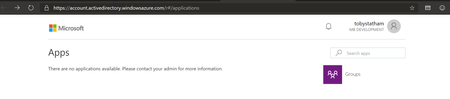
As it stands currently, by default (i.e. no changes have been made to Azure AD permissions) a Guest User can see all the Office 365 Groups in a tenant they have been invited to, nothing has to be changed to enable this.
To me this isn't least permissive, a guest user should only be able to see the groups they are a member of.
Either way, can I change this in anyway to a guest user can only see the groups they are a member of.
- May 16, 2019Afaik no! VasilMichev ?
- VasilMichevMay 16, 2019MVP
You should be able to control this via the Azure AD blade -> User Settings -> External collaboration settings -> Guest users permissions are limited. Here's the description of the setting:
Yes means that guests do not have permission for certain directory tasks, such as enumerate users, groups, or other directory resources.
No means that guests have the same access to directory data that regular users have in your directory.Should be being the keyword..
- Toby StathamMay 16, 2019Brass Contributor
VasilMichev Thanks for the information
I have "Guest users permissions are limited" already set to Yes. I think this must be the default setting as I haven't changed this.
Is this a bug? It says that a guest user does not have permissions to enumerate groups and a guest user can clearly do this.


