Forum Discussion

Vertical section list in OneNote (especially Windows 10 Mobile version)

Asjad Khan wrote:I guess you are using OneNote2016 and you need One Note.
As much I know, there is no way to shift Sections on left or right side in OneNote2016.
You can find Sections and topics on left or right side in OneNote.
Note: OneNote and OneNote 2016 are two different applications, their core function is same but some features are different.
Here you can find the difference between two : https://support.office.com/en-us/article/What-s-the-difference-between-OneNote-and-OneNote-2016-a624e692-b78b-4c09-b07f-46181958118f
Here you will find some tips to add section and page tab https://support.office.com/en-us/article/Create-a-new-section-in-OneNote-2016-for-Windows-bf8b9967-66f3-46c8-af5d-76ef96d53787?ui=en-US&rs=en-US&ad=US
Earlier I was using One Note but now I am happy with One Note 2016.
Thank you
Hi, thanks for posting.
I'm using OneNote 2013 which is very similar to OneNote 2016 (if it looks like on screenshots in links that you provided.
Here's how you can change view by clicking arrows in right-upper corner of page or through Options -> View -> Whole Page View (or something like that) in your OneNote:
The lack of vertical section list (vertical list is for sure in OneNote 2013, OneNote Online and perhaps in OneNote 2016) is in OneNote app for Windows 10 and Windows 10 Mobile. I already posted a suggestion (through feedback app in Windows 10 and Windows 10 mobile) to bring vertical list into those apps.

Thanks for writing
That view is for full screen view / F11 view. (which you have posted).
In One Note 2016 you can shift page names from left to right side of screen, but you can not shift them in horizontal line like sections.
In One Note you can change that view.
- Grzegorz NazarMay 08, 2017Tin Contributor
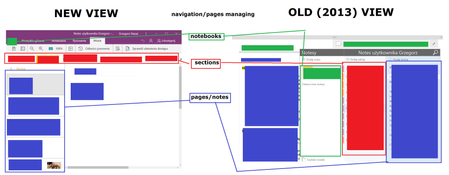
Page and section layout shown below is what I wanted to switch on in OneNote (especially Windows 10 Mobile app). Sadly, after what you wrote, I'm sure that the layout has changed - now it's less useful and harder to manage (especially if you have a lot of notes and on mobile devices like phones). Luckily I still have OneNote 2013 on my laptop...