Forum Discussion

Office ProPlus self-install does not include Teams
 Apr 09, 2020
Andrew Matthews have your users restarted the device after installing Office? Per the documentation, Teams install is not complete until the next logon:
To complete the installation of Teams on new or existing installations of Office 365 ProPlus, either restart the device or have the user log off and log back on.
 Microsoft
Andrew Matthews have your users restarted the device after installing Office? Per the documentation, Teams install is not complete until the next logon:
To complete the installation of Teams on new or existing installations of Office 365 ProPlus, either restart the device or have the user log off and log back on.
- Andrew MatthewsApr 09, 2020Tin Contributor
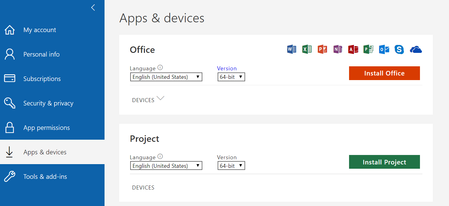
Brad Corob Thank you, you're correct - the user does get Teams after a reboot in this fashion. But this is a terrible end-user experience! The Office 365 portal where the user goes to trigger a self-install of ProPlus still shows the Skype logo and makes no mention of Teams!
 ChristianBergstromApr 09, 2020Silver ContributorI can confirm there is no mention of Teams and no visible logo as well. However, during the installation you can see the Teams logo next to the other applications. Not the best end-user experience though, as already pointed out.
 JohnForthApr 15, 2020Brass Contributor
Do you have Teams in your XML file that's used for Install? Visit config.office.com and set up a new XML, if my best suggestion. Then use ODT to Install or your favorite software deployment method.
