Forum Discussion

Meeting Notes through Outlook
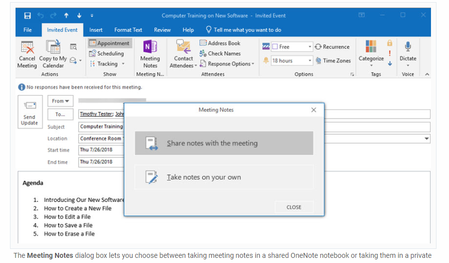

Now when I click on "Take notes on your own" nothing happens. This has really impacted me as I use OneNote heavily for note taking in meetings where tracking attendees and other details is important.
I have to assume it broke in an Office update if we're all seeing the same issue at roughly the same time?
My office version is v 1910 (Build 12130.20344 Click-to-run) Monthly Channel

+1, also on monthly channel. "Take notes on your own." hasn't worked for a day or two. Very frustrating as I use this several times a day 😞
- Mike AtkinsonNov 15, 2019Copper Contributor
There's a related community post entitled "Meeting Notes to OneNote stopped working" where a work-around is mentioned. In OneNote (both the 2016 on-premise and UWP versions) there's an option to insert Meeting Details. Once linked to your account - maybe this assumes O365 Outlook? - you can select which meeting and the meeting details are pasted into the current page. In effect the same information is created as used to be done on "Take notes on your own" option from the Outlook add-in.
This works for me!
- AnthonyB_AUSNov 26, 2019Brass Contributor
Thanks for sharing that Mike Atkinson !
After a couple of weeks of using this new method, I think I like this method even better than the old one!
- Melissa2985Nov 26, 2019Brass Contributor
Mike AtkinsonThanks! This works great for me. Good enough.
