Forum Discussion

zwethuko
Jun 21, 2021Copper Contributor
AIP Scanner - Unable to authenticate and setup Microsoft Azure Information Protection
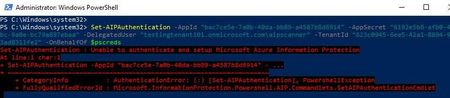
Hi All, I'm getting stuck in below issues to test AIP Scanner. Error Set-AIPAuthentication : As I worked through below the steps I had faced the following issue and cannot m...

terryhugill
Oct 25, 2023Brass Contributor
I am having the same issue. When I run Set-Aipauthentication without parameters, it brings up a connection to Azure Information Protection and asks for credentials. When I run the full command, it does not. This is the problem. How I get around that is another question. I will post when I find an answer.
terryhugill
Oct 25, 2023Brass Contributor
mykhan In my case, I recreated the secret in the app registration and it worked. I don't know if there was a copy/paste error in the original, but it is working now. If you haven't already, please check your settings using this guide: - https://learn.microsoft.com/en-gb/azure/information-protection/rms-client/clientv2-admin-guide-powershell#how-to-label-files-non-interactively-for-azure-information-protection.
- terryhugillOct 25, 2023Brass Contributor
JXG2300the only thing I can think of that would cause this would be the server was rebooted or patched afterwards. I rebooted my server and it was still doing it.
- JXG2300Oct 25, 2023Copper ContributorThe registry entry worked for me, again... except not immediately, again. After adding the registry entry, we re-ran the Set-AIPAuthentication command and it did not work immediately after, we came back to it the next day and it worked.