Forum Discussion

AIP Scanner - Unable to authenticate and setup Microsoft Azure Information Protection
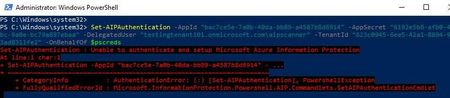

Our network is very restrictive. Based on the DLP scanner documentation, I have allowed my server to reach out to these URLs.
Source- AIP-Scanner Server
Destination: Below URLs/ Wildcards
*.aadrm.com
*.azurerms.com
*.informationprotection.azure.com
informationprotection.hosting.portal.azure.net
*.aria.microsoft.com
*.protection.outlook.com
Am I missing anything?

- mykhanOct 25, 2023Copper Contributor
Hi, how are you?
No errors occur when running Set-AipAuthentication without any parameters, but running the full command results in errors.I would appreciate it if someone could verify if I am on the correct path.
My service account is created via on-premises AD and can be synchronized via Azure AD.
- The service account has the following privileges:
- Can log in locally with user rights.
- The account is the local admin on the machine.
- This account has local administrator rights and has permission to write to the SQL Server master database.
- One of the four accesses mentioned below is all that is missing.
- Compliance Administrator
- Compliance Data Administrator
- Security Administrator
- Organization Management
My official account is being used as a delegated user due to having one of the four accesses mentioned above in the purview portal.
Thanks in advance,- terryhugillOct 25, 2023Brass ContributorHave you created the Application registration and given it the appropriate permissions in Entra ID/Azure AD?
- mykhanOct 25, 2023Copper ContributorAll necessary permissions are granted when creating the application registration, sir.
- terryhugillOct 25, 2023Brass Contributor
mykhan In my case, I recreated the secret in the app registration and it worked. I don't know if there was a copy/paste error in the original, but it is working now. If you haven't already, please check your settings using this guide: - https://learn.microsoft.com/en-gb/azure/information-protection/rms-client/clientv2-admin-guide-powershell#how-to-label-files-non-interactively-for-azure-information-protection.
- JXG2300Oct 25, 2023Copper ContributorThe registry entry worked for me, again... except not immediately, again. After adding the registry entry, we re-ran the Set-AIPAuthentication command and it did not work immediately after, we came back to it the next day and it worked.
- terryhugillOct 25, 2023Brass Contributor
JXG2300the only thing I can think of that would cause this would be the server was rebooted or patched afterwards. I rebooted my server and it was still doing it.