Forum Discussion

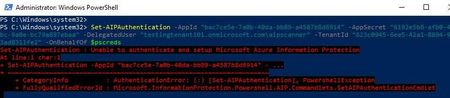
AIP Scanner - Unable to authenticate and setup Microsoft Azure Information Protection

https://learn.microsoft.com/en-us/powershell/module/azureinformationprotection/Start-AIPScannerDiagnostics?view=azureipps
As mentioned previously by PeterForster this revealed a connection issue to a https://login.windows.net. We entered the URL into a browser and it was failing due to certificate mismatch via a proxy. Once the root certification authority that generated the certificate was resolved the process completed successfully.

I'm currently stuck with the same error "Unable to authenticate and setup Microsoft Azure Information Protection".
I have a service account, synced with AAD, all permissions granted in server machine and so on.
I'm executing the command using the -OnBehalfOf.
When i run the "Start-AIPScannerConfiguration" i get success with the connectivity to "*login.windows.net*", "*protection.outlook.com*", "*aadrm.com", connection to database also successfully but then is prompted the error message: "TokenCache is missing for ..." which suggests to run the "Set-AIPAuthentication".
I also verified the requirements regarding Network connectivity (https://learn.microsoft.com/en-us/microsoft-365/compliance/deploy-scanner-prereqs?view=o365-worldwide#windows-server-requirements), but without success so far.
Any suggestions on how to resolve?
Thanks.
 mykhanAug 31, 2023Copper Contributor
Hi, how are you? andrevrodrigues
Were you able to resolve this? I have the same issue:
This is the error message I'm getting:PS C:\Users\*****> Start-AIPScannerDiagnostics
Scanner information:
SQL server: *******.
Cluster: *******.
Scanner user: *******
Connectivity check for: https://login.windows.net/common completed successfully
Connectivity check for: https://dataservice.protection.outlook.com completed successfully
Connectivity check for: https://api.aadrm.com/ completed successfully
Invalid database schema or cannot access the scanner DB. To update the database schema, run Update-AIPScanner. Make sure all nodes run the same AIP client version.
SQL error: Message The database owner SID recorded in the master database differs from the database owner SID recorded in database ‘*******'. You should correct this situation by resetting the owner of database *********' using the ALTER AUTHORIZATION statement.
TokenCache is missing for ***\****. Scanner authentication failed or was reset. Run Set-AIPAuthentication (using OnBehalfOf Parameter if needed) to acquire the authentication token. Learn more at: https://docs.microsoft.com/en-us/powershell/module/azureinformationprotection/set-aipauthentication?view=azureipps
- andrevrodriguesSep 19, 2023Copper ContributorHi,
Have you tried the steps above?
It worked well for me and apparently, it also worked for Victor_Lea and for JXG2300.- mykhanSep 19, 2023Copper ContributorThank you for your response. I have tried all the possible steps, but no luck.
Our network is very restrictive. Based on the DLP scanner documentation, I have allowed my server to reach out to these URLs.
Source- AIP-Scanner Server
Destination: Below URLs/ Wildcards
*.aadrm.com
*.azurerms.com
*.informationprotection.azure.com
informationprotection.hosting.portal.azure.net
*.aria.microsoft.com
*.protection.outlook.com
Am I missing anything?
 JXG2300Aug 10, 2023Copper Contributor
were you able to resolve this issue? I've done the following and no luck:
- Exclude svc_aipscanner account from MFA registration
- Added E5 license to svc_aipscanner account for AIP licensing
- Verified Tenant ID, App ID, Secret ID values and svc_aipscanner credentials
- Verified access to key URLs from the endpoint to confirm communication with AAD service
Any information or guidance would be appreciated.