Forum Discussion

Office 365 Secure Score Website Has Blanks and Bugs
 Sep 25, 2018I see what you mean time.. likely a browser issue, good luck with that! :-)

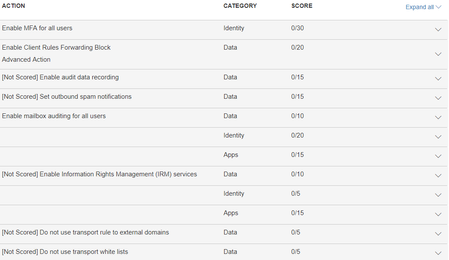
The first screenshot is on Score Analyzer > Incomplete. The second screenshot is from Dashboard > "Actions in the Queue"
It looks correct to me.. "Incomplete Actions" are at zero or not full points because you have not completed that line item. The "Actions in Queue" are essentially the same thing as the default filter shows All, so it all depends on which filter you have selected. I don't see any issues so hopefully this helps to clarify.
- Roger SeekellSep 25, 2018Brass Contributor
There is a problem. Look at the first picture, and there are two lines with no title. One is Identity for 20 points, and one is Apps for 15 points. The second picture shows expanding them. There is no title or description. When I click "Learn more", I get a blank screen on the right. This is a problem. There is no way to know what the points are for. Something is disconnected and not showing the information for the score item.
- Rod FoleySep 25, 2018Tin ContributorI see what you mean time.. likely a browser issue, good luck with that! :-)
- Roger SeekellSep 26, 2018Brass Contributor
Looks like you're right. It displays correctly in IE and Edge.
And then I cleared browsing history in Chrome, and it looks right again.
Thanks!