Forum Discussion

Azure Active Directory Seamless Single Sign-On
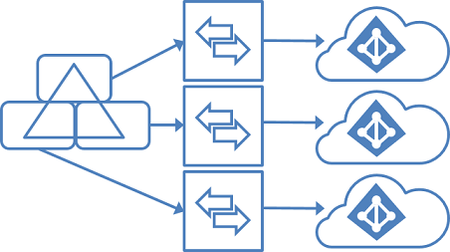
- Feb 02, 2018
sorry... then I guess your only option is trying multiple federated tenants, but I'm not sure it's supported


In their says: The single sign-on (SSO) option for password synchronization and pass-through authentication can be used with only one Azure AD tenant.
I would take this as it is not possible.

Will Mellor, this is actually possible, but not supported due to how the Azure AD Connect works. Technically, SSO is using Kerberos. This means that both the "server" account in AD and the "service" (Azure AD) must share the secret (see this doc).
When enabling SSO, Azure AD connect creates a computer account in AD (AZUREADSSOACC), service principalname (https://autologon.microsoftazuread-sso.com), and configures SSO in Azure AD. During this process, it creates a random password for AZUREADSSOACC and tells this to Azure AD.
So, if you could set the password for each tenant to be the same, this would work. With Microsoft tools, this is not possible. However, this feature will be introduced in the next version of my AADInternals PowerShell module after being presented and announced in T2'19 infosec conference.
- Feb 20, 2020
Here are the steps how to set the SSO password using AADInternals toolkit.
First step is to install and import the AADInternals PowerShell Module.
Install-Module AADInternals
Import-Module AADInternals
After successful import, the text "AADInternals v0.2.8 by @NestoriSyynimaa" should appear.
Next step is to acquire an OAuth access token for pass-through authentication (PTA) which is using same tokens than DesktopSSO (=internal technical name for Seamless SSO). The following command prompts for credentials (must be Global Admin) and stores it to a variable.
$pt=Get-AADIntAccessTokenForPTANow, assuming that the Seamless SSO is enabled, you can list the current settings using the following command.
Get-AADIntDesktopSSO -AccessToken $ptThe output should be similar to below, depending on how many domains is registered.
Domains      : company.com
Enabled      : True
ErrorMessage :
Exists       : True
IsSuccessful : True
Now, the password for a specific domain can be set using the following command
Set-AADIntDesktopSSO -AccessToken $pt -DomainName "company.com" -Password "MyVerySecretPassword"As the password must be same in cloud and on-prem, the command prompts whether the on-prem computer account should also be set. If you answer "yes" the command tries to set password using following commands.
$computer = Get-ADComputer "AZUREADSSOACC"
Set-ADAccountPassword -Identity $computer.DistinguishedName -NewPassword (ConvertTo-SecureString -AsPlainText "MyVerySecretPassword" -Force)
If you do not have required rights to on-prem AD or Set-ADAccountPassword cmdlet is not available, you should answer "no" and do it manually. Also, the Kerberos Key Distribution Center must be restarted in Domain Controller for the changes to take effect.
After the password for cloud is successfully set you should get the following output:
IsSuccessful ErrorMessage
------------ ------------
    True
In the case of multiple tenants, the password needs to be set to each tenant for the specific domains the tenant is using.
However, everyone should be aware that if the password (i.e. "MyVerySecretPassword") is known, you can login as any user of the tenant using user's sid:
# Generate kerberos ticket
$kt=New-AADIntKerberosTicket -SidString "S-1-5-xx-xxxxxxxxxx-xxxxxxxxxx-xxxxxxxxxx-xxx" -Password "MyVerySecretPassword"

# Get access token using the ticket, for example to Exchange Online
$at=Get-AADIntAccessTokenForEXO -KerberosTicket $kt -Domain "company.com"

# Send an email message
Send-AADIntOutlookMessage -AccessToken $at -Recipient "someone@company.com" -Subject "Message" -Message "<h1>Message</h1>"
Luckily, you cannot bypass MFA using this technique. More info at http://o365blog.com/post/kerberos/
 Michael_SzaboApr 30, 2020Copper Contributor
This is fantastic Nestori Syynimaa. I have a few questions regarding this:
1. Microsoft recommends cycling the Kerberos decryption key every 30 days using the Update-AzureADSSOForest command, where does this solution fit into that?
2. Do we complete the cycling task for each Office 365 tenant or can we not do it because it will break something?
3. I haven't been able to confirm, is the Kerberos decryption key the same as the computer account password?
4. Should we be regularly changing the computer account password using your solution?
5. When installing AD Connect for additional tenants, I assume we don't need to tick the Enable single sign-on tickbox in the install wizard so that it doesn't fail to create the computer account later in the process? Or do we need to delete the computer account and have it recreate when configuring for each tenant then use your process to set the password up for all tenants again?
 pesosSep 19, 2020Copper Contributor
Michael_Szabo Nestori Syynimaa would love to know the answers too!
 Harold BaeleMar 03, 2020MCT
Anyone allready implemented this somewhere? Is there any statement from Microsoft allowing this in a production environment? Nestori Syynimaa
- Mar 03, 2020No, not that I know 😞
- Will MellorOct 08, 2019Tin Contributor
Nestori SyynimaaThank you will keep a look out
