Forum Discussion

Audit Log Discrepancy - Remove-UnifiedGroup Activity

I tried this command:
Search-UnifiedAuditLog -startdate 1-Feb-2018 -EndDate 13-Mar-2018 -SessionCommand ReturnNextPreviewPage -Resultsize 3000 -RecordType AzureActiveDirectory -operations "Delete group."
And it found the 2 instances of deleted groups in the last 30 or so days... Both on 12-Feb. One was deleted already (it doesn't show up with Get-AzureADMSDeletedGroup), the other is available for restore (still). The operation you need is "Deleted Group." Does that help?
TR
- Dean_GrossMar 14, 2018Silver Contributor
Thanks for running a test using powershell, I have been having all kinds of other issues with the logs in this tenant and this looks like another data problem. I used that same activity in the UI, and did not get the expected result.
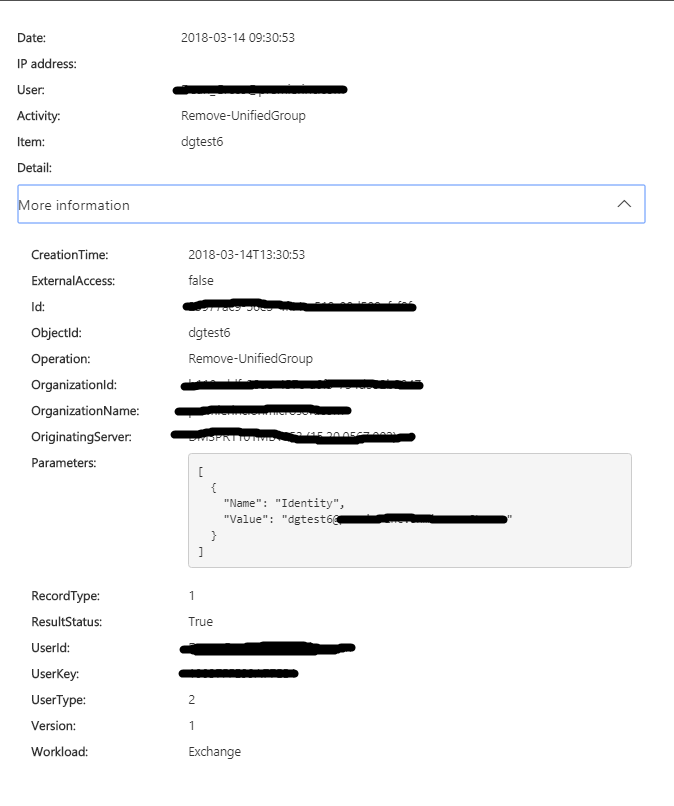
This image shows the activity that I performed (filtered by my account). When I remove my account and add the Deleted Group activity I don't any results. When I run the script you provided me I don't get the result either. If i change my date range, i get some results, but not the event shown in my screen shot.
The UI is showing the event that occurred yesterday, but powershell is only showing events through 2 days ago. Its very strange.
- TonyRedmondMar 14, 2018MVP
It could be a data glitch with audit data flowing into the audit log. I'd file a support case and ask Microsoft to check things out.
PowerShell and the search UI look at the same data. I see the same in both places. One thing I did notice is that you see a Deleted Group record when a group is soft-deleted and a Hard Delete Group record when it is eventually removed permanently.