Forum Discussion

zwethuko
Jun 21, 2021Copper Contributor
AIP Scanner - Unable to authenticate and setup Microsoft Azure Information Protection
Hi All, I'm getting stuck in below issues to test AIP Scanner. Error Set-AIPAuthentication : As I worked through below the steps I had faced the following issue and cannot m...
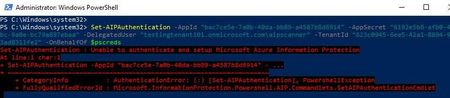

terryhugill
Oct 25, 2023Brass Contributor
Strange! Have you tried recreating the secret on the application registration and using the new details? I know it seems unlikely, but it worked for me.

mykhan
Oct 25, 2023Copper Contributor
I recreated the secrets a couple of times, but no luck. I've opened a ticket with Microsoft. I'll keep you informed if I come across anything.
- terryhugillOct 26, 2023Brass ContributorLet us know if that helps.
- JXG2300Oct 26, 2023Copper ContributorI did create the label with auto-labeling, I also followed the advice of deleting the MSIP folder on the local server, with no luck. I think it is a byproduct of not finishing the install on the same day. like i mentioned on my prev post , both times I've had to add the registry key we had to wait after changing the registry until the next day, then the Set-AipAuthentication command worked. Maybe recreate the Label? I will try that...
- terryhugillOct 26, 2023Brass ContributorHave you assigned your label with automated labelling settings to the AIP Scanner account?
- Oct 26, 2023
Hi all,
I had the same issue. I checked the DWORD registry key "UseOnlineConfiguration" in HKLM\SOFTWARE\Wow6432Node\Microsoft\MSIP and saw the value was 0.
After typing the command "Set-AIPScannerConfiguration -OnlineConfiguration On", I was able to reconfigure the Set-AIPAuthentication properly.
- JXG2300Oct 25, 2023Copper ContributorPlease do keep us updated. I'm also now getting a Error: Policy Missing, but that's for another thread... haha.
