Forum Discussion

zwethuko
Jun 21, 2021Copper Contributor
AIP Scanner - Unable to authenticate and setup Microsoft Azure Information Protection
Hi All, I'm getting stuck in below issues to test AIP Scanner. Error Set-AIPAuthentication : As I worked through below the steps I had faced the following issue and cannot m...

mykhan
Oct 25, 2023Copper Contributor
Hi, how are you?
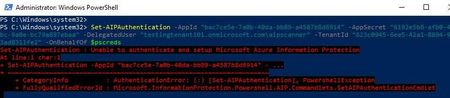
No errors occur when running Set-AipAuthentication without any parameters, but running the full command results in errors.
I would appreciate it if someone could verify if I am on the correct path.
My service account is created via on-premises AD and can be synchronized via Azure AD.
- The service account has the following privileges:
- Can log in locally with user rights.
- The account is the local admin on the machine.
- This account has local administrator rights and has permission to write to the SQL Server master database.
- One of the four accesses mentioned below is all that is missing.
- Compliance Administrator
- Compliance Data Administrator
- Security Administrator
- Organization Management
My official account is being used as a delegated user due to having one of the four accesses mentioned above in the purview portal.
Thanks in advance,

terryhugill
Oct 25, 2023Brass Contributor
Have you created the Application registration and given it the appropriate permissions in Entra ID/Azure AD?
- terryhugillOct 26, 2023Brass ContributorLet us know if that helps.
- JXG2300Oct 26, 2023Copper ContributorI did create the label with auto-labeling, I also followed the advice of deleting the MSIP folder on the local server, with no luck. I think it is a byproduct of not finishing the install on the same day. like i mentioned on my prev post , both times I've had to add the registry key we had to wait after changing the registry until the next day, then the Set-AipAuthentication command worked. Maybe recreate the Label? I will try that...
- terryhugillOct 26, 2023Brass ContributorHave you assigned your label with automated labelling settings to the AIP Scanner account?
- Oct 26, 2023
Hi all,
I had the same issue. I checked the DWORD registry key "UseOnlineConfiguration" in HKLM\SOFTWARE\Wow6432Node\Microsoft\MSIP and saw the value was 0.
After typing the command "Set-AIPScannerConfiguration -OnlineConfiguration On", I was able to reconfigure the Set-AIPAuthentication properly.
- JXG2300Oct 25, 2023Copper ContributorPlease do keep us updated. I'm also now getting a Error: Policy Missing, but that's for another thread... haha.
- mykhanOct 25, 2023Copper ContributorI recreated the secrets a couple of times, but no luck. I've opened a ticket with Microsoft. I'll keep you informed if I come across anything.
- terryhugillOct 25, 2023Brass ContributorStrange! Have you tried recreating the secret on the application registration and using the new details? I know it seems unlikely, but it worked for me.
- mykhanOct 25, 2023Copper ContributorAll necessary permissions are granted when creating the application registration, sir.
