Forum Discussion

AIP Scanner - Unable to authenticate and setup Microsoft Azure Information Protection
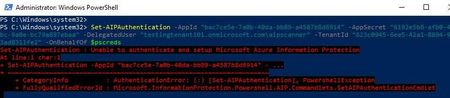

Hi, how are you? andrevrodrigues
Were you able to resolve this? I have the same issue:
This is the error message I'm getting:
PS C:\Users\*****> Start-AIPScannerDiagnostics
Scanner information:
SQL server: *******.
Cluster: *******.
Scanner user: *******
Connectivity check for: https://login.windows.net/common completed successfully
Connectivity check for: https://dataservice.protection.outlook.com completed successfully
Connectivity check for: https://api.aadrm.com/ completed successfully
Invalid database schema or cannot access the scanner DB. To update the database schema, run Update-AIPScanner. Make sure all nodes run the same AIP client version.
SQL error: Message The database owner SID recorded in the master database differs from the database owner SID recorded in database ‘*******'. You should correct this situation by resetting the owner of database *********' using the ALTER AUTHORIZATION statement.
TokenCache is missing for ***\****. Scanner authentication failed or was reset. Run Set-AIPAuthentication (using OnBehalfOf Parameter if needed) to acquire the authentication token. Learn more at: https://docs.microsoft.com/en-us/powershell/module/azureinformationprotection/set-aipauthentication?view=azureipps

Have you tried the steps above?
It worked well for me and apparently, it also worked for Victor_Lea and for JXG2300.
- mykhanSep 19, 2023Tin ContributorThank you for your response. I have tried all the possible steps, but no luck.
Our network is very restrictive. Based on the DLP scanner documentation, I have allowed my server to reach out to these URLs.
Source- AIP-Scanner Server
Destination: Below URLs/ Wildcards
*.aadrm.com
*.azurerms.com
*.informationprotection.azure.com
informationprotection.hosting.portal.azure.net
*.aria.microsoft.com
*.protection.outlook.com
Am I missing anything? terryhugillOct 25, 2023Brass ContributorI am having the same issue. When I run Set-Aipauthentication without parameters, it brings up a connection to Azure Information Protection and asks for credentials. When I run the full command, it does not. This is the problem. How I get around that is another question. I will post when I find an answer.
- mykhanOct 25, 2023Tin Contributor
Hi, how are you?
No errors occur when running Set-AipAuthentication without any parameters, but running the full command results in errors.I would appreciate it if someone could verify if I am on the correct path.
My service account is created via on-premises AD and can be synchronized via Azure AD.
- The service account has the following privileges:
- Can log in locally with user rights.
- The account is the local admin on the machine.
- This account has local administrator rights and has permission to write to the SQL Server master database.
- One of the four accesses mentioned below is all that is missing.
- Compliance Administrator
- Compliance Data Administrator
- Security Administrator
- Organization Management
My official account is being used as a delegated user due to having one of the four accesses mentioned above in the purview portal.
Thanks in advance,
- JXG2300Sep 19, 2023Tin ContributorFor some reason, it did not work immediately for me. It did work however the day after when we tried it again. Just something strange to keep in mind - based on my experience.