Forum Discussion

dmarquesgn
May 05, 2024Iron Contributor
Powershell extract TPM and Envryption Readiness information from Intune
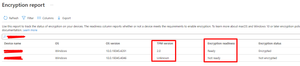
Hi, I'm trying to automate a report on Bitlocker coverage on Intune managed devices. I'm using Graph API to extract device information from Intune, querying this URL: "https://graph.microsoft.com...

tobiassandberg
May 16, 2024Iron Contributor
dmarquesgn I have tried but I cannot get it to work. I would recommend a Microsoft support case for this one.

dmarquesgn
May 19, 2024Iron Contributor
tobiassandberg Hi, after all it was not needed to open a case, as I figured it out. You have to increment the skip in order to move to the next page.
Here's my full code to get it working and now I've got all the devices just like I want.
$skip = 0
$DevicesEncryptionStatus = @()
do {
$params = @{
	select = @(
		"DeviceId"
		"DeviceName"
		"DeviceType"
		"OSVersion"
		"TpmSpecificationVersion"
		"EncryptionReadinessState"
		"EncryptionStatus"
		"UPN"
	)
	filter = ""
	skip = $skip
	search = ""
	top = 50
}

Get-MgBetaDeviceManagementReportEncryptionReportForDevice -BodyParameter $params -OutFile "C:\Temp\Intune-Encryption.json"

# Assume that $jsonFilePath contains the path to your JSON file
$jsonFilePath = "C:\Temp\Intune-Encryption.json"
# Read the JSON file and convert it to a PowerShell object
$json = Get-Content -Path $jsonFilePath -Raw | ConvertFrom-Json
$totalrows = $json.TotalRowCount
$values = $json.values

foreach ($value in $values)
{
    $row = new-object PSObject -Property @{
        DeviceId = $value[0];
        DeviceName = $value[1];
        DeviceType = $value[2];
        DeviceType_loc = $value[3];
        EncryptionReadinessState = $value[4];
        EncryptionReadinessState_loc = $value[5];
        EncryptionStatus = $value[6];
        EncryptionStatus_loc = $value[7];
        OSVersion = $value[8];
        TpmSpecificationVersion = $value[9];
        UPN = $value[10]
        }
        $DevicesEncryptionStatus += $row
}
$skip += 50
} while ($skip -le $totalrows)
Hope it might help anyone in the future.