Forum Discussion

Get Azure Joined Device Information using PowerShell
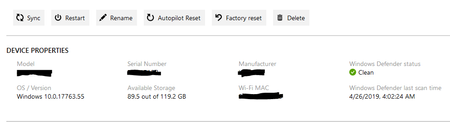

EntilZha except for the Windows Defender status, the command Get-IntuneManagedDevice will give you all the information in the device properties.
What kind of information are you looking for specifically?
- EntilZhaAug 27, 2019Iron Contributor
bjcls thank you for responding.
So far I was able get most the of information I'm looking for from an Azure Join device except:
- Recent Check-In (users that log into the device)
- group memberships for device
Thank You again for your help.
-Larry
- bjclsAug 27, 2019Brass Contributor
EntilZha I'm glad I could help!
If you use the 'beta' schema instead of 'v1.0' (https://github.com/Microsoft/Intune-PowerShell-SDK#known-issues-and-workarounds) and you run the same command: Get-IntuneManagedDevice an extra value: usersLoggedOn is shown.
Update-MSGraphEnvironment -SchemaVersion 'beta'
This value shows an ID that you can lookup with the command: Get-AzureADUser -ObjectId
For your second question I've used a Graph API call, because I didn't find a command in this module:
$apiUrl = "https://graph.microsoft.com/beta/devices/$Deviceid/memberof"
$Data = Invoke-RestMethod -Headers @{Authorization = "Bearer $($Tokenresponse.access_token)" } -Uri $apiUrl -Method Get
$DeviceGroups = ($Data | select-object Value).ValueOr you could check the members of a group: Get-AADGroupMember instead of the group membership.
- jenstfSep 03, 2019Brass Contributor
bjcls EntilZha If you don't find the commands you are looking for in the Microsoft.Graph.Intune module you could just run Invoke-MSGraphRequest and use the complete MS Graph API
If you have already connected with Connect-MSGraph you don't have to spend multiple code lines getting an auth token and creating the correct header.

