Forum Discussion

Unable to setup Microsoft Global Secure Access
 Jul 28, 2024
Hi here's a update, make sure to assign users to the traffic forwarding profiles or nothing will work, once you have assigned it give it a bit of time ( 1 ish hour ) and then restart your endpoints, it should work instantly.

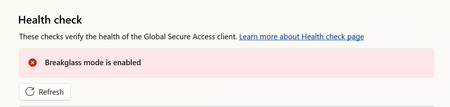
Mine is setup and working, but after a reboot I'll get the 'Global Secure Access has been disabled by your organization' ... then in the advanced diagnostics I see the 'break glass mode is enabled' message...
If I wait about 5 minutes, it goes away and everything works fine again.
Not really sure what's up with it...
- Jeff_BleyDec 09, 2024
Microsoft
This was a bug in the previous client version. Update the GSA client to 2.8.45+ and the 5 min delay should go away.
 JKnowlesMDMOct 16, 2024Copper Contributor
lowlevel I'm seeing the same currently. I did test GSA in another M365 tenant before deploying for real and I don't see this issue. It's enabled straight away after I logon.
Are you still seeing the same thing or did you find a way to fix it?
- lowlevelDec 18, 2024Tin Contributor
This issue seemed to go away... I'm not entirely sure what fixed it, but perhaps paid license instead of trial, or applying forwarding policies to all users instead of groups.
