Forum Discussion

Some On Premise mailboxes are provided with wrong external email address in Office 365
- Sep 20, 2020
Apologies, I lost track of this issue. The reason that the email address could not be changed is the Source of authority is on-premises AD, not Azure AD. To change this email address you would need to do so from the on-premises Exchange Admin Centre, not the Exchange Online one.

Hi, the users who are getting the .onmicrosoft addresses in O365 are most likely setup in on-premises AD with a domain.local UPN suffix as opposed to the routable domain name. You will need to set their UPN's in AD to have a suffix of yourdomain.com as opposed to yourdomain.local. This should correct the issue for the affected users.
 AtanasMMay 31, 2020Iron Contributor
PeterRising could you explain more precisely the phrase:
"setup in on-premises AD with a domain.local UPN suffix as opposed to the routable domain name".
Thanks inn advance.
- PeterRisingMay 31, 2020MVP
In Active Directory Users and Computers, open one of the affected users and go to the Account tab.
You will see that the UPN is set to username@domain.local. Under the domain suffix part of the UPN, click the dropdown and select the actual email domain and the UPN should change to username@domain.com
If you don't see the domain in the dropdown, you may need to add it as an additional UPN suffix in Active Directory Domains and Trusts. However, as you have said that some of your users are syncing correctly, I am guessing the domain will be available to you in the dropdown.
- AtanasMJun 02, 2020Iron Contributor
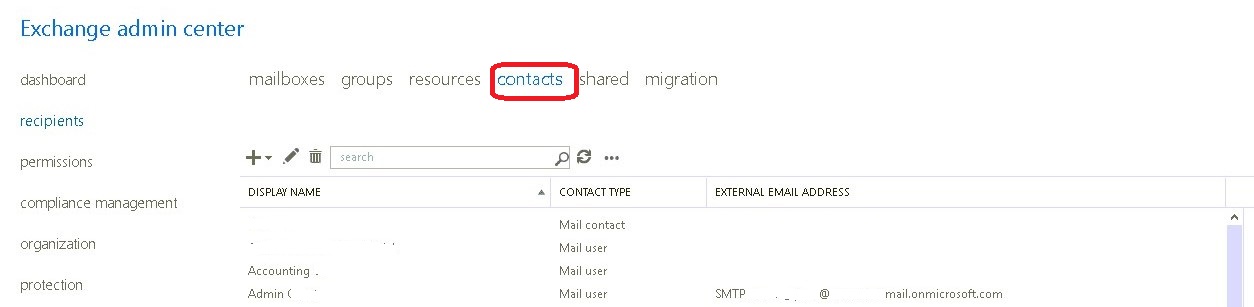
PeterRising I checked in Microsoft 365 admin center and Active Directory and the usernames are displayed correctly with the correct domain. The issue exists only in "Contacts" in Exchange Admin Center. Please check the attached screenshot.
What do you think, what could be the reason for that and how can I solve it?