Forum Discussion

Azure AD group-based license management for Office 365 and more
- Apr 05, 2017
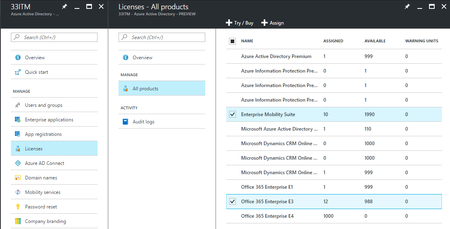
Group-based licensing will be a feature of all the paid Azure AD editions. (And it is included now during the public preview period)
That means Azure AD Basic, Azure AD Premium P1 and P2 and of course EMS E3 and E5 that includes Azure AD Premium.
Also will be a feature of Office 365 E3 and Office 365 E5 when it becomes generally avaialble.
Now, for EDU organizations things are rather simple becasue Azure AD Basic is free for them so by adding the free Azure AD Basic edition to their tenant they can use Group-Based Licensing for all the related products.
I hope this helps
Nasos


Not going to the complexity of tracking in Access or SQL, just powershell looking at existing AD groups we have set up and existing users.
 MICHELLE SEIPELJun 14, 2017Brass Contributor
Would you be willing to share your PowerShell scripts, or the relevants parts with your personal info stripped out? I'm always looking for better/faster ways to do things, but I understand that some people may not want to provide that info due to potential security reasons.
- Brent EllisJun 14, 2017Silver Contributor
Glad to share. Below is a sanitized version, the only thing you really have to do is set your AD domain (line 7), and then create your Groups as necessary.
May take a bit to disect the different scenarios I had to account for.
The main workhorse is the deltaSync function which adds and removes users as needed (instead of repopulating the license groups).
The getADGroupMembers function gets all users in an AD group and adds them to an array variable
What I am doing is basically building arrays of users:
- Iterate through all users (I am looking for users that have an Employee ID attribute which is connected to our HR system)
- Bouncing that list of users off of different Groups which will determine if they get E3's versus E5's.
- Also bouncing that list of users of a few other license groups
- Then use the deltaSync functions to update O365 License Groups which are used directly in AAD License Templates.
I have one OU with Groups that our ID Administrators can update to account for specific scenarios.
Then I have another OU with Groups that are specifically for licenses (that will be used in AAD).
We are specifically applying licenses for E3's, E5's (with S4B phone), E5's (without S4B phone), Advanced Threat Protection (to E3 users), Project Online, Project Pro, Visio, PSTN Conferencing, EMS, Exchange Plan 2, and maybe one or two others.
Our AADConnect runs every 30 minutes, and this script runs every 30 minutes offset by 15 minutes from the AADConnect sync job.
$ScriptStart = (Get-Date) Add-Type -AssemblyName System.DirectoryServices.AccountManagement function getADGroupMembers($adGroupName){ $adGroupArray = @() $domain='' #Enter your AD domain here $pc = New-Object System.DirectoryServices.AccountManagement.PrincipalContext([System.DirectoryServices.AccountManagement.ContextType]::Domain, $domain) $group2 = [System.DirectoryServices.AccountManagement.GroupPrincipal]::FindByIdentity($pc, [System.DirectoryServices.AccountManagement.IdentityType]::Name, $adGroupName) $group2.Members.GetEnumerator() | % { #Write-Host $_.DistinguishedName if($adGroupName -like "O365 License*"){ $adGroupArray += "$($_.DistinguishedName)" } else { if($_.DistinguishedName -notlike "*Disabled Objects*"){ $adGroupArray += "$($_.DistinguishedName)" } } } if($adGroupArray.Length -gt 0){ return $adGroupArray } else { return $null } } function checkMembership($user, $array){ return $array.contains($user) } function checkMembershipCount($checkGroup, $checkName){ $count = 0 foreach($checkGroupItem in $checkGroup){ if($checkGroupItem.contains($checkName)){ $count += 1 } } return $count } function removeArray($array1, $array2){ if($array2){ $array3 = @() foreach($item in $array1){ if(!$array2.Contains($item)){ $array3 += $item } } return $array3 } else { return $array1 } } function deltaSync($adGroupName, $replaceWith){ $replaceWith = $replaceWith | select -uniq Write-Host "`nProcessing Target Group:" $adGroupName -ForegroundColor Cyan $adGroupArray = getADGroupMembers -adGroupName "$adGroupName" if($replaceWith.Length -eq 0 -and $adGroupArray.Length -eq 0){ return $false } if($replaceWith.Length -eq 0 -and $adGroupArray.Length -ne 0){ Write-Host "Removing all users" Remove-ADGroupMember "$adGroupName" -Members $adGroupArray -Confirm:$false return $false } if($replaceWith.Length -ne 0 -and $adGroupArray.Length -eq 0){ Write-Host "Adding all users" Add-ADGroupMember "$adGroupName" -Members $replaceWith -Confirm:$false return $false } # Compare the differences between the two groups $arrayDiff = Compare-Object -ReferenceObject $adGroupArray -DifferenceObject $replaceWith # Iterate the differences and determine Adds / Removes $usersToAdd = @() $usersToRemove = @() foreach($arrayItem in $arrayDiff){ if($arrayItem.SideIndicator -eq "=>"){ Write-Host "Add to Array" $arrayItem.InputObject -ForegroundColor Yellow $usersToAdd += "$($arrayItem.InputObject)" } else { Write-Host "Remove from Group" $arrayItem.InputObject -ForegroundColor Red $usersToRemove += "$($arrayItem.InputObject)" } } # Add users to target Group if($usersToAdd.Length -gt 0){ Write-Host "`nAdd Users Now" -ForegroundColor Yellow Add-ADGroupMember "$adGroupName" -Members $usersToAdd -Confirm:$false } # Remove users from target Group if($usersToRemove.Length -gt 0){ Write-Host "`nRemove Users Now" -ForegroundColor Yellow Remove-ADGroupMember "$adGroupName" -Members $usersToRemove -Confirm:$false } return $true } # Define E5 Groups to Check $groups = getADGroupMembers -adGroupName "Groups with E5 Licenses (O365 Groups)" # Build array of Users that get E5's based on Group Membership $E5UserArray = @() foreach($group in $groups){ #$group | get-member $adGroup = Get-ADGroup $group #$zzz = Get-ADGroup $adGroup -Properties * #$zzz.DisplayName #Write-Host "Processing $($adGroup.DisplayName)" $members = getADGroupMembers -adGroupName "$($adGroup.Name)" foreach($member in $members){ #Write-Host " $member" $E5UserArray += "$($member)" } } $Users_S4BCloud = getADGroupMembers -adGroupName "Users with S4B Phone - Cloud" $Users_S4BOnPrem = getADGroupMembers -adGroupName "Users with S4B Phone - On Prem" $Devices_S4B = getADGroupMembers -adGroupName "Devices with S4B Conferencing" # Get all Users from AD $Users = Get-ADUser -Filter * -Properties userprincipalname,msRTCSIP-PrimaryUserAddress,Company,Created,displayName,employeeNumber,c,proxyAddresses,mail,sAMAccountType,userAccountControl,enabled $Users_E5 = @() $Users_E5_CloudPBX = @() $Users_E3 = @() $Users_EMS = @() $count = 0 foreach($user in $users){ if(($User.EmployeeNumber) -and ($User.DistinguishedName -like "*OU=Users*") -and ($User.DistinguishedName -notlike "*OU=_Disabled Objects*")){ $count += 1 if(checkMembership -array $E5UserArray -user "$user"){ if(checkMembership -array $Users_S4BCloud -user "$user"){ $Users_E5_CloudPBX += "$($user.DistinguishedName)" } else { $Users_E5 += "$($user.DistinguishedName)" } } else { $Users_E3 += "$($user.DistinguishedName)" } $Users_EMS += "$($user.DistinguishedName)" } } Write-Host "`nFound $count Users`n" # Build array of Users that will receive no license Write-Host "`n****`nExclusion List `n****" -ForegroundColor Green $ExclusionList = getADGroupMembers -adGroupName "Users with No License" Write-Host $ExclusionList Write-Host "`n****`nDevices with S4B Conferencing `n****" -ForegroundColor Green $Devices_S4B = getADGroupMembers -adGroupName "Devices with S4B Conferencing" deltaSync -adGroup "O365 License Users with E5 (Devices)" -replaceWith $Devices_S4B Write-Host "`n****`nUsers with Visio `n****" -ForegroundColor Green $Users_Visio = getADGroupMembers -adGroupName "Users with Visio" $Users_Visio = removeArray -array1 $Users_Visio -array2 $ExclusionList deltaSync -adGroup "O365 License Users with Visio" -replaceWith $Users_Visio Write-Host "`n****`nUsers and Devices with Exchange Only `n****" -ForegroundColor Green $Users_ExchangeOnly = getADGroupMembers -adGroupName "Service Accounts with Email Only" $Users_VM = getADGroupMembers -adGroupName "Devices with Voicemail" $Users_ExchangeOnly = $Users_ExchangeOnly + $Users_VM $Users_ExchangeOnly = removeArray -array1 $Users_ExchangeOnly -array2 $ExclusionList deltaSync -adGroup "O365 License Users with Exchange Only" -replaceWith $Users_ExchangeOnly Write-Host "`n****`nE5 (Regular) `n****" -ForegroundColor Green $Users_E5 = removeArray -array1 $Users_E5 -array2 $ExclusionList deltaSync -adGroup "O365 License Users with E5 (Regular)" -replaceWith $Users_E5 Write-Host "`n****`nE5 (Phone) `n****" -ForegroundColor Green $Users_E5_CloudPBX = $Users_E5_CloudPBX $Users_E5_CloudPBX = removeArray -array1 $Users_E5_CloudPBX -array2 $ExclusionList deltaSync -adGroup "O365 License Users with E5 (Phone)" -replaceWith $Users_E5_CloudPBX Write-Host "`n****`nE3 (Temporary) `n****" -ForegroundColor Green $Users_E3_Temporary = getADGroupMembers -adGroupName "Users with E3 Limited Licenses" deltaSync -adGroup "O365 License Users with E3 (Temporary)" -replaceWith $Users_E3_Temporary Write-Host "`n****`nE3 (Service Accounts) `n****" -ForegroundColor Green $Users_E3_ServiceAccounts = getADGroupMembers -adGroupName "Service Accounts with E3 Licenses" deltaSync -adGroup "O365 License Users with E3 (Service Accounts)" -replaceWith $Users_E3_ServiceAccounts $Users_E3_Manual = getADGroupMembers -adGroupName "Users (Non-Buckman) with E3 Licenses" $Users_E3 = $Users_E3 + $Users_E3_Manual $Users_E3 = removeArray -array1 $Users_E3 -array2 $ExclusionList $Users_E3 = removeArray -array1 $Users_E3 -array2 $Users_E3_Temporary Write-Host "`n****`nE3 / ATP `n****" -ForegroundColor Green deltaSync -adGroup "O365 License Users with E3" -replaceWith $Users_E3 Write-Host "`n****`nATP `n****" -ForegroundColor Green $Users_ATP = $Users_E3 + $Users_E3_Temporary deltaSync -adGroup "O365 License Users with ATP" -replaceWith $Users_ATP Write-Host "`n****`nEMS `n****" -ForegroundColor Green $Users_EMS = $Users_E3 + $Users_E5_CloudPBX + $Users_E5 $Users_EMS = removeArray -array1 $Users_EMS -array2 $Devices_S4B $Users_EMS = removeArray -array1 $Users_EMS -array2 $ExclusionList deltaSync -adGroup "O365 License Users with EMS" -replaceWith $Users_EMS Write-Host "`n****`nProject Pro `n****" -ForegroundColor Green $Users_ProjectPro = getADGroupMembers -adGroupName "Users with Project Pro" deltaSync -adGroup "O365 License Users with Project Pro" -replaceWith $Users_ProjectPro Write-Host "`n****`nProject Online `n****" -ForegroundColor Green $Users_ProjectOnline = getADGroupMembers -adGroupName "Users with Project Online" deltaSync -adGroup "O365 License Users with Project Online" -replaceWith $Users_ProjectOnline Write-Host "`n****`nUsers with PSTN Conferencing `n****" -ForegroundColor Green $Users_PSTN = getADGroupMembers -adGroupName "Users with PSTN Conferencing" $Users_PSTN = removeArray -array1 $Users_PSTN -array2 $ExclusionList deltaSync -adGroup "O365 License Users with PSTN Conferencing" -replaceWith $Users_PSTN $ALL_E5_1 = getADGroupMembers -adGroupName "O365 License Users with E5 (Phone)" $ALL_E5_2 = getADGroupMembers -adGroupName "O365 License Users with E5 (Regular)" $ALL_E5 = $ALL_E5_2 + $ALL_E5_1 $ALL_E3 = getADGroupMembers -adGroupName "O365 License Users with E3" $Users_PSTN_E3 = removeArray -array1 $Users_PSTN -array2 $ALL_E5 $Users_PSTN_E3 = removeArray -array1 $Users_PSTN_E3 -array2 $ExclusionList deltaSync -adGroup "O365 License Users with PSTN Conferencing (E3)" -replaceWith $Users_PSTN_E3 $Users_PSTN_E5 = removeArray -array1 $Users_PSTN -array2 $ALL_E3 $Users_PSTN_E5 = removeArray -array1 $Users_PSTN_E5 -array2 $ExclusionList deltaSync -adGroup "O365 License Users with PSTN Conferencing (E5)" -replaceWith $Users_PSTN_E5 $ScriptEnd = (Get-Date) $RunTime = New-Timespan -Start $ScriptStart -End $ScriptEnd "`nElapsed Time: {0}:{1}:{2}" -f $RunTime.Hours,$Runtime.Minutes,$RunTime.Seconds- MICHELLE SEIPELJun 14, 2017Brass ContributorWow! Thank you!! I'm going to dig into this and see what I can re-use for my environment, which looks like it will end up saving us more time here too. I really appreciate your post!!