Forum Discussion

Azure AD group-based license management for Office 365 and more
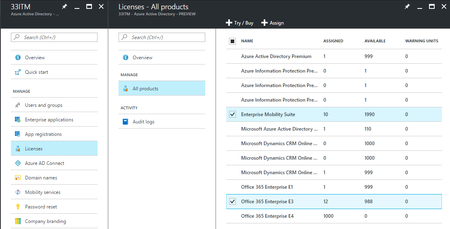
- Apr 05, 2017
Group-based licensing will be a feature of all the paid Azure AD editions. (And it is included now during the public preview period)
That means Azure AD Basic, Azure AD Premium P1 and P2 and of course EMS E3 and E5 that includes Azure AD Premium.
Also will be a feature of Office 365 E3 and Office 365 E5 when it becomes generally avaialble.
Now, for EDU organizations things are rather simple becasue Azure AD Basic is free for them so by adding the free Azure AD Basic edition to their tenant they can use Group-Based Licensing for all the related products.
I hope this helps
Nasos


I have also set up a powershell script set up that will clear membership of those groups and refresh them every hour or so to account for changes (new users, changed situations, etc).
If I am clearing those groups out and replacing all the users frequently, is there anything to be concerned with from the group-based licensing process perspective? Or other gotchas?
Or would this be a pretty low risk process (given the code is built to properly populate the groups)?
- BrjannBrekkanApr 11, 2017
Microsoft
Not a good idea as when you clear the membership GBL will trigger a remove of the license and then you would have to re-apply them and hope that your timing matches that of GBL updating the assignments in Office for example. You will likely get some very unpredictable results if you keep running this on your groups.
I understand that you are doing this as a simple version of dynamic groups which is an Azure AD Premium feature but you have to change the logic to not remove member unless he/she is really removed.
Brjann
- Brent EllisApr 11, 2017Silver ContributorThat's disappointing, will have to experiment with how to handle delta changes to achieve same goal :(
 MICHELLE SEIPELApr 12, 2017Brass Contributor
Brent, we do something similar here, but we do delta changes to group membership using powershell, instead of a wipe and replace. It does rely on an extra step using MS Access or SQL Server to hold your combined AD/Azure data - for example, we have a scheduled task to powershell export the current Azure group listings/memberships and import into SQL Express. Another task to powershell export our local Active Directory info into same SQL Express. Then a query to find the new AD people, and another query to find the removed AD people. Export those 2 queries to a text file, and use those 2 to powershell the delta changes up to Azure. It sounds like a lot but once you get it built, it's very quick and easy to run, and it sounds like you're almost doing that now.
